Forbidden Four: Make your own pirate multi

This is an archive of a topic from NESdev BBS, taken in mid-October 2019 before a server upgrade.
View original topic
Forbidden Four: Make your own pirate multi
by on (#22524)
Someone in another topic wants to pirate an official MMC1 multicart. That got me thinking about how I could make my own MMC1 multicart. It took me one night to develop a framework for a pirate multicart on an SNROM board, which I called Forbidden Four. You need the following ROM images (not included):
  • The Legend of Zelda or any other 1 Mbit game with the same init code
  • Two NROM-128 games
  • One NROM-256 game

The multicart engine itself is free software. I got it to work on FCEU, Nestopia, and Nintendulator. Does this work on the real thing? And why is it called Forbidden Four?

by on (#22525)
I wonder if you could also squeeze Galaxian in there...
Fun fact: Over 90% of "Menu Only" multicart roms also contain Galaxian.

by on (#22531)
Dwedit wrote:
I wonder if you could also squeeze Galaxian in there...
Fun fact: Over 90% of "Menu Only" multicart roms also contain Galaxian.

The menu is 24 KiB, and I plan to use all 8 KiB of its CHR ROM in future versions. How much CHR does Galaxian use?

by on (#22534)
Probably 8k. But CHR is compressible.

by on (#22535)
I am familiar with CHR compression, having used PackBits RLE before in Who's Cuter. But it would still be a tight squeeze. I'd have to get at least 1.25:1 compression to put the CHR of five NROM games (menu, bros, ice, galaxian, smb) into a single 32 KiB bank, using an NES-friendly decoder, to make room. Or I'd have to piece together unused parts of LoZ. But I don't find it worth the effort because Galaxian doesn't fit with the theme of the collection, which might make the menu lose HRA points. If you want to try, go right ahead.

Dwedit: You have a defect report waiting for you on PH.

EDIT: I've updated the menu with a better logo.

by on (#22539)
Pucrunch was originally for the 6502 (C64) until it was ported to other platforms.

by on (#22550)
Doesn't the Pucrunch unpacker need access to the entire previously decompressed data? The Commodore 64 computer had 64 KiB of RAM, but the NES has only 2 KiB of internal RAM, and I don't want to disturb LoZ's saved data.

by on (#22551)
Hack it to read and write from vram (with screen off), but then it would probably get slow. Or make it operate in 1k chunks.

by on (#22552)
Love the title screen...just puttin' that out...got it to work just fine.

by on (#22563)
Quote:
Doesn't the Pucrunch unpacker need access to the entire previously decompressed data? The Commodore 64 computer had 64 KiB of RAM, but the NES has only 2 KiB of internal RAM, and I don't want to disturb LoZ's saved data.

<tepples mode on>
What about using the FDS ?
</tepples mode off>

by on (#22567)
FDS has a fixed ROM bank in CPU $E000-$FFFF that cannot be mapped out. NROM games would need to be disassembled, shuffled around to fit in $6000-$DFFF, and reassembled. An MMC3-based pirate multi that doesn't use a submapper would have the same problem.

Galaxian isn't in Animal Crossing. (Neither is Pitfall or Golden Axe, but that's another story.) I could (barely) fit Tetramino into the menu segment, but that's not in AC either, and my whole point of making something AC-related is to get as far away from Tetris as I can.

by on (#22572)
Dwedit wrote:
"Menu Only" multicart roms


Most of these are dumped this way because all the games they contained were either already dumped or they were based on existing dumps, right?

...how many of them actually banked 1 8K segment mirrored 4 times and not 1 32K segment mirrored in rom?

...Just pondering...


...I also would imagine a "Forbidden Five" near impossible...

by on (#22575)
Actually, SXROM could handle, say 2 SNROM games (one of them being 128k, and the other either 256k or 128k), and sevral NROM-256/NROM-128 games for the last 256k/128k. It could even have 2 SOROM games (among several NROM games), or more SNROM games that only switch 32kb ROM banks and don't rely on a fixed bank at $c000-$ffff.
It could be done like that :
BANK 0-6 : SNROM/SOROM game 1
BANK 7-14 : Various NROM games
BANK 15 : SNROM/SOROM game 1 fixed bank, reset code
BANK 16-23 : SNROM/SOROM game 2
BANK 24-30 : SNROM/SOROM game 2 OR various NROM games
BANK 31 : SNROM/SOROM game 2 fixed bank, reset code

by on (#22636)
AWal wrote:
Love the title screen...just puttin' that out...got it to work just fine.


Yeah, the title screen looks awesome. I plan on trying this out soon!

NC

by on (#27592)
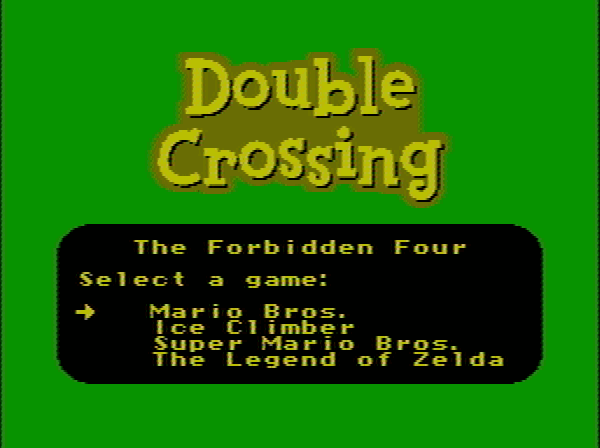
For the record, the title screen looks like this:
Image
Why "Double Crossing"? Google it. Also Google "Body Harvest Moon".

AWal wrote:
...I also would imagine a "Forbidden Five" near impossible...

It would be possible to add Punch-Out!! by converting PxROM to FxROM by duplicating the $A000 bank, converting Zelda to FxROM by replacing MMC1 write subroutines with MMC4 write subroutines, adding a "submapper" to switch between Punch-Out!! and F4 and between CHR ROM and CHR RAM (like TQROM?), and following mostly the same guide. Or you could just ask _Lao@Tzu for a trade code.

Bregalad wrote:
Actually, SXROM

Very not common.

Bregalad wrote:
or more SNROM games that only switch 32kb ROM banks

Like which?

by on (#27626)
Building Forbidden Multicart
press any key to continue. . .
How long does this take?

Nwever mind this is great.

by on (#27665)
how do you convert a rom to ines format?

by on (#27666)
With a Hex Editor
Type in:
NES 0x1A (prg size/16k) (chr size/8k) (mapper*0x10 | flags), then 9x 00's.

by on (#27675)
ok, ill give it a shot then. thanks

by on (#27680)
I didn't convert them to iNES. I just used NES and it still worked. Try the Zelda PRG0.

by on (#27682)
NotTheCommonDose wrote:
I didn't convert them to iNES. I just used NES and it still worked.

That's because .nes files are almost always in iNES format or an extension thereof.

by on (#27695)
Hi Tepples,

I'm curious about the technical aspects of making the multi-cart. I've never used MMC1 before so I'm only going by what I read in a doc by firebug.

I see from your asm code you use 32K bankswitching (bit 3 of register but you do not do this for Zelda. You mentioned something about the Zelda init code. Is this how you are able to deal with Zelda's vectors (NMI, reset, etc..) if you dont clobber 0xFFFA-0xFFFF.

One other question. This one is not very important. I assume you are able to use the NROM 128 games because you ensure that the 16K goes into the $8000-$FFFF memory and it doesnt matter what goes in the $000-7FFF bank. Are there "known" games where this is not a safe assumption. Meaning that the coder is expecting his $0000-$7FFF memory to be the same and is making reference to those addresses instead of the ones in the $8000-FFFF range?

Al

by on (#27696)
albailey wrote:
I'm curious about the technical aspects of making the multi-cart. I've never used MMC1 before so I'm only going by what I read in a doc by firebug.

The info for a lot of mappers in Firebug's doc is slightly outdated. When in doubt, I'd be more inclined to trust NESdevWiki articles such as MMC1, which incorporate newly discovered information.

Quote:
I see from your asm code you use 32K bankswitching (bit 3 of register but you do not do this for Zelda.

For Zelda, I jump to where Zelda expects to jump.

Quote:
You mentioned something about the Zelda init code. Is this how you are able to deal with Zelda's vectors (NMI, reset, etc..) if you dont clobber 0xFFFA-0xFFFF.

Zelda's mapper init code lies in the $FFxx page. Right when it's about to load a bank into $8000-$BFFF and jump to the main code, I patch it to switch a different bank (the menu) into $8000 and jump to a different address (part 1 of the menu).

The menu has three parts:
  1. BOOTCODE: Loader for part 2, running in ROM
  2. RAMCODE: A trampoline that copies CHR data from ROM to RAM and switches banks, running in RAM
  3. CODE: The menu proper
Part 1 copies part 2 from ROM to RAM, sets up part 3 as the desired ROM to run, and jumps to part 3.

Quote:
I assume you are able to use the NROM 128 games because you ensure that the 16K goes into the $8000-$FFFF memory and it doesnt matter what goes in the $000-7FFF bank. Are there "known" games where this is not a safe assumption.

You mean loading 16 KB into $C000-$FFFF and not into $8000-$BFFF. Yes, some NROM-128 games depend on $C000-$FFFF being mirrored down into $8000-$BFFF. But as far as I can tell, Mario Bros. and Ice Climber are not two of them, and those were my main impetus for developing this multi.

In fact, I could probably replace one of the NROM-128 games with an NROM-256 game by implementing some simplistic CHR compression. Contra used a form of RLE compression, and so did my Who's Cuter demo. But I probably won't bother, nor will I bother about Galaxian.
by on (#27709)
Hell, use aplib instead of RLE for better compression. Now someone just needs to make a VRAM version :)

by on (#27716)
I have recently made a LZSS compressor/decompressor, and coded the decompression routine in 6502 asm (writing to VRAM). The code is quite "raw", since these are my own tests, but if interests anyone, you're all free to test it out and play with it. There most likely are bugs. Download here: http://www.sendspace.com/file/vkcw2o.

There is no documentation at all, just messy code. This will work on windows machines, just drop the file to compress over the "compress.wsf", and decompress files by dropping them over "decompress.wsf". Keep in mind that this is all done with windows scripting (meaning that the code is all there), so it does take a long time to compress. Just wait and it will eventually finish. I wouldn't try this with very large files though.

by on (#31910)
They're talking about this over in NESemdev, treating it as an MMC1 emulation test case. But before we go tweaking emulators to run invalid code that another emulator happens to run, I'd like to know: Has anybody ever run this on an NES, either through a PowerPak or (better) through a hacked-up SNROM board?

by on (#31928)
tepples wrote:
Galaxian isn't in Animal Crossing. (Neither is Pitfall or Golden Axe, but that's another story.) I could (barely) fit Tetramino into the menu segment, but that's not in AC either, and my whole point of making something AC-related is to get as far away from Tetris as I can.


There are no references to Galaxian in Animal Crossing and is also a NES game. The golden axe is an Item you use to cut down trees infinitely but is a SNES game not NES unless theres a pirate or some sort that I'm not aware of. Also the pitfall is an item used to play a joke on a unwitting idiot and some people think it's a NES game actually called Super Pitfall. What does Galaxian have to do with AC?

by on (#31931)
NotTheCommonDose wrote:
tepples wrote:
Galaxian isn't in Animal Crossing. (Neither is Pitfall or Golden Axe, but that's another story.)

There are no references to Galaxian in Animal Crossing

Which was exactly the point that I was trying to explain to people requesting specific support for games that were not in AC.

by on (#31943)
I guess they never played AC.

by on (#32062)
NotTheCommonDose wrote:
Building Forbidden Multicart
press any key to continue. . .
How long does this take?

Nwever mind this is great.


i get stuck here as well. after i press a key, the program closes out. what went wrong?

by on (#32063)
nevermind, it made the game (f4.nes is the name). that went really quick.

by on (#32064)
how would i change the title screen if i wanted to add new games?

by on (#32065)
To change the menu labels assigned to the games, edit dxinglogo.nam using a nametable editor or even a hex editor. But if by "add" you really meant add, what kinds of games (mapper and size) were you planning on adding?

by on (#32066)
sorry, i meant replace. i tried to put the ice climber and mario bros. on there, but they were 40 kb in size and it said it was too big. so i replaced them with yie ar kung fu and antarctic adventure. it worked fine on nestopia, so ill try it on the power pak when i get home and if that works ill put it on a cart.

by on (#32071)
coinheaven wrote:
sorry, i meant replace. i tried to put the ice climber and mario bros. on there, but they were 40 kb in size and it said it was too big.

Those games are NROM-128, and NROM-128 is always 24592 bytes including the iNES header. If you have 40976 byte files, you have overdumps.

by on (#32077)
ahh gotcha, i was wondering why they were so big

by on (#32078)
An overdump is?

by on (#32079)
Did you try Google Search or Yahoo! Search?

by on (#32080)
In this case, I think JFGI is more appropriate.

by on (#32091)
tepples wrote:


I always use Google before I ask.

by on (#32093)
NotTheCommonDose wrote:
An overdump is?


Sometimes I think you're exaggerating... and you know what I mean.
Well, overdump is when a ROM image is duplicated, with or without truncated data, or even a regular copy.

by on (#32095)
NotTheCommonDose wrote:
I always use Google before I ask.

Well, when google already gave you the answer, you shouldn't go asking anyway. It's OK, it's a step that's easy to overlook.

by on (#32194)
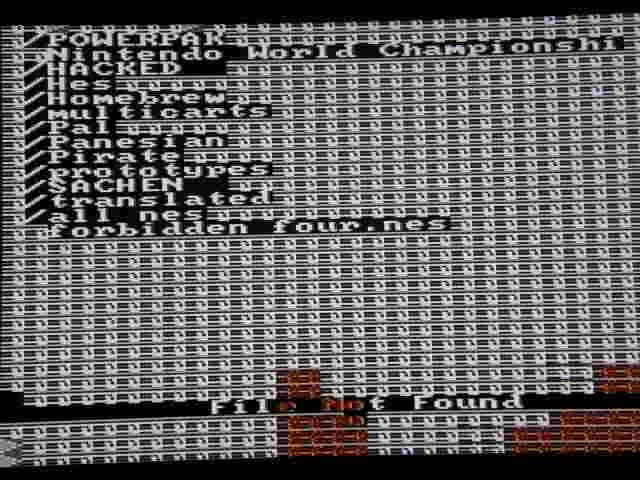
i got around to testing this on the power pak. all i got was a frozen garbled screen and at the bottom said "file not found". so i assume this wouldnt work on a cart either, right?

by on (#32195)
The word "found" isn't even in the F4 menu code, so it must have been printed by the PowerPak's own menu. Could you take a photo of the frozen garbled screen?

by on (#32213)
Image

by on (#32215)
That's not my font. It looks like Terminal, when F4 uses something that looks more like Chicago.

Then there might be something up inside the PowerPak itself. Maybe it can't find the battery file. F4 has a battery because Zelda has a battery.

by on (#34462)
Love the title screen...

by on (#34470)
I wonder if this explains why Bill and Ted's Excellent Video Game Adventure has copies of the reset vector and bankswitching code every 16k?