Skip navigation
NintendoAge
Welcome, Guest! Please Login or Join
Loading...

AVS In the Pipe (waiting) Hello other AVS owners

Jul 7, 2017 at 6:36:52 PM
Tulpa (2)
avatar
< Wiz's Mom >
Posts: 11404 - Joined: 12/24/2013
California
Profile
Originally posted by: UKWildcats
Your best bet is to just get your NES upgraded to HD. That's what I did and I am so glad. I'm not a fan of the AVS mainly because I just don't get why you would want it over upgrading a real NES unless it was the cost.
For me I wanted new equipment, not one that still uses a 30+ year old a flawed connector. You could add a BLW, but then you're in it for more dollars. If I'm paying that much, I want all new stuff, not a unit that sat in the attic for most of the 90s and aughts.

I'm also currently using a 720p set, and will probably upgrade to a 4k TV, which is a multiple of 720 and would scale perfectly.

Of course, I don't really have any attachment to the "real" NES. If it plays the carts, it's all good, IMO.


Edited: 07/07/2017 at 06:46 PM by Tulpa

Jul 7, 2017 at 6:47:14 PM
UKWildcats (8)
avatar
< Crack Trooper >
Posts: 144 - Joined: 02/10/2017
South Carolina
Profile
Originally posted by: pezmed
 
Originally posted by: UKWildcats
 
Originally posted by: Gloves
 
Originally posted by: PuppyWaffles
 
Originally posted by: Gloves
 
Originally posted by: darkchylde28
 
Originally posted by: pezmed
Originally posted by: Tulpa

I want the replacement connector.  

Last year's batch had some delays, too. It's China(town.)
Tulpa, is that the weak USB connection you are talking about? Do we know if the new units have this issue fixed?

Not to speak for Tulpa, but I believe he's referring to the replacement cartridge connectors.  He and I were pretty active in the "green strip" discussions that occurred shortly after launch and have both been waiting for the updated replacement connectors to resolve that issue since.  Without buying a new system, there's not really any way to get a replcaement USB connector.  The ones originally used can be secured to the board via nylon washers, screws & nuts, but so far as I know bunnyboy isn't offering to "upgrade" any existing units to the through-hole component that was supposed to be used for the USB this time around.

Also, I saw on the retroUSB Facebook page last night that the wireless controllers have arrived, so I'm assuming that it means that the new batch of systems and the replacement connectors have either arrived as well or can't be far behind.  Fingers crossed!

They ALSO posted on Facebook yesterday that China sent them a dumb question about the power/reset buttons on the AVS, and so the next batch will MAYBE make it to him in August. I'll not be surprised if this ends up being last years Christmas gift to myself this Christmas.
I hear ya man. I ordered mine last year too. I've considered cancelling the order and just buying a Switch with the money. I know it will get here but I'm starting to feel like my 2016 order will arrive in 2018...


USBRetro's reputation is pretty solid and I understand it isn't their fault, but if it were me I would have found a new factory.

I've considered getting a refund and buying either a Switch or an Analogue NT Mini. At the end of the day I really just wanna play my NES games on my modern tv as nicely as possible, and the AVS was a good way to do that AND post scores on the scoreboards here on NA. But tbh the Scoreboards don't seem to get much attention, and I'll probably be right back to where I was with Playstation - getting a bunch of "trophies" that don't amount to anything and are purely for show, yet I'm the only one who cares.

I dunno man, I'm getting hella disillusioned.


Your best bet is to just get your NES upgraded to HD. That's what I did and I am so glad. I'm not a fan of the AVS mainly because I just don't get why you would want it over upgrading a real NES unless it was the cost.


I considered the NES upgrade option but I'd rather have the option of playing old school on NES if I want and then have the reliability and connectivity (computer usb and HD) of a newer machine with graphics such as the AVS. I considered getting the Analogue NT but just too much money for one system. Though I spent a good bit with AVS and an Everdrive. But that is flexible options to play with on NES and AVS.

I don't understand what you said. With the NES HD upgrade you are upgrading your old school NES to HD, so you can play old school on it. As far as resolution, the NES HD upgrade has a higher resolution than the AVS. I think the AVS only goes to 720 while the NES HD upgrade goes to 1080. It's also about half the price of the Analogue.

The AVS does have the scoreboard and built in Famicom, so it does have its advantages. 

-------------------------
Licensed NES Games: 665/679
Unlicensed NES Games: 167/182
Licensed PAL NES Games: 6/34


Edited: 07/07/2017 at 06:48 PM by UKWildcats

Jul 7, 2017 at 6:50:41 PM
UKWildcats (8)
avatar
< Crack Trooper >
Posts: 144 - Joined: 02/10/2017
South Carolina
Profile
Originally posted by: PuppyWaffles
 
Originally posted by: UKWildcats
 
Originally posted by: Gloves
 
Originally posted by: PuppyWaffles
 
Originally posted by: Gloves
 
Originally posted by: darkchylde28
 
Originally posted by: pezmed
Originally posted by: Tulpa

I want the replacement connector.  

Last year's batch had some delays, too. It's China(town.)
Tulpa, is that the weak USB connection you are talking about? Do we know if the new units have this issue fixed?

Not to speak for Tulpa, but I believe he's referring to the replacement cartridge connectors.  He and I were pretty active in the "green strip" discussions that occurred shortly after launch and have both been waiting for the updated replacement connectors to resolve that issue since.  Without buying a new system, there's not really any way to get a replcaement USB connector.  The ones originally used can be secured to the board via nylon washers, screws & nuts, but so far as I know bunnyboy isn't offering to "upgrade" any existing units to the through-hole component that was supposed to be used for the USB this time around.

Also, I saw on the retroUSB Facebook page last night that the wireless controllers have arrived, so I'm assuming that it means that the new batch of systems and the replacement connectors have either arrived as well or can't be far behind.  Fingers crossed!

They ALSO posted on Facebook yesterday that China sent them a dumb question about the power/reset buttons on the AVS, and so the next batch will MAYBE make it to him in August. I'll not be surprised if this ends up being last years Christmas gift to myself this Christmas.
I hear ya man. I ordered mine last year too. I've considered cancelling the order and just buying a Switch with the money. I know it will get here but I'm starting to feel like my 2016 order will arrive in 2018...


USBRetro's reputation is pretty solid and I understand it isn't their fault, but if it were me I would have found a new factory.

I've considered getting a refund and buying either a Switch or an Analogue NT Mini. At the end of the day I really just wanna play my NES games on my modern tv as nicely as possible, and the AVS was a good way to do that AND post scores on the scoreboards here on NA. But tbh the Scoreboards don't seem to get much attention, and I'll probably be right back to where I was with Playstation - getting a bunch of "trophies" that don't amount to anything and are purely for show, yet I'm the only one who cares.

I dunno man, I'm getting hella disillusioned.


Your best bet is to just get your NES upgraded to HD. That's what I did and I am so glad. I'm not a fan of the AVS mainly because I just don't get why you would want it over upgrading a real NES unless it was the cost.
How much extra is your HD famicom?


I don't have a Famicom, but I'm not interested in those games. You could always get an adapter and play them on your NES.
 

-------------------------
Licensed NES Games: 665/679
Unlicensed NES Games: 167/182
Licensed PAL NES Games: 6/34

Jul 7, 2017 at 6:54:54 PM
UKWildcats (8)
avatar
< Crack Trooper >
Posts: 144 - Joined: 02/10/2017
South Carolina
Profile
Originally posted by: Tulpa
 
Originally posted by: UKWildcats
Your best bet is to just get your NES upgraded to HD. That's what I did and I am so glad. I'm not a fan of the AVS mainly because I just don't get why you would want it over upgrading a real NES unless it was the cost.
For me I wanted new equipment, not one that still uses a 30+ year old a flawed connector. You could add a BLW, but then you're in it for more dollars. If I'm paying that much, I want all new stuff, not a unit that sat in the attic for most of the 90s and aughts.

I'm also currently using a 720p set, and will probably upgrade to a 4k TV, which is a multiple of 720 and would scale perfectly.

Of course, I don't really have any attachment to the "real" NES. If it plays the carts, it's all good, IMO.


I get it, but I wanted a real NES. I figured since the real NES has been around for 30 years, it will be able to be fixed for at least another 30 years. I upgraded it to a BLW, too. Even if 720 was a multiple of 4K, wouldn't you still be able to get a better scale of 1080?
 

-------------------------
Licensed NES Games: 665/679
Unlicensed NES Games: 167/182
Licensed PAL NES Games: 6/34


Edited: 07/07/2017 at 06:58 PM by UKWildcats

Jul 7, 2017 at 7:00:13 PM
Tulpa (2)
avatar
< Wiz's Mom >
Posts: 11404 - Joined: 12/24/2013
California
Profile
Originally posted by: UKWildcats
I get it, but I wanted a real NES. I figured since the real NES has been around for 30 years, it will be able to be fixed for at least another 30 years.
That's fair enough, but the FPGA in the AVS can fix most issues and add new features with firmware upgrades. That's a big advantage, IMO.

 
Originally posted by: UKWildcats
 Even if 720 was a multiple of 4K, wouldn't you still be able to get a better scale of 1080?
 
NES starts with 240 resolution. 720 is 3*240. 1080 is 4.5, so you have pixel fudging, whereas 720 is coming up in integers. I'd rather integer scale all the way up.


Edited: 07/07/2017 at 07:02 PM by Tulpa

Jul 7, 2017 at 7:10:40 PM
pezmed (0)
avatar
< Little Mac >
Posts: 65 - Joined: 06/27/2017
Mississippi
Profile
Originally posted by: UKWildcats

Originally posted by: pezmed
 
Originally posted by: UKWildcats
 
Originally posted by: Gloves
 
Originally posted by: PuppyWaffles
 
Originally posted by: Gloves
 
Originally posted by: darkchylde28
 
Originally posted by: pezmed
Originally posted by: Tulpa

I want the replacement connector.  

Last year's batch had some delays, too. It's China(town.)
Tulpa, is that the weak USB connection you are talking about? Do we know if the new units have this issue fixed?

Not to speak for Tulpa, but I believe he's referring to the replacement cartridge connectors.  He and I were pretty active in the "green strip" discussions that occurred shortly after launch and have both been waiting for the updated replacement connectors to resolve that issue since.  Without buying a new system, there's not really any way to get a replcaement USB connector.  The ones originally used can be secured to the board via nylon washers, screws & nuts, but so far as I know bunnyboy isn't offering to "upgrade" any existing units to the through-hole component that was supposed to be used for the USB this time around.

Also, I saw on the retroUSB Facebook page last night that the wireless controllers have arrived, so I'm assuming that it means that the new batch of systems and the replacement connectors have either arrived as well or can't be far behind.  Fingers crossed!

They ALSO posted on Facebook yesterday that China sent them a dumb question about the power/reset buttons on the AVS, and so the next batch will MAYBE make it to him in August. I'll not be surprised if this ends up being last years Christmas gift to myself this Christmas.
I hear ya man. I ordered mine last year too. I've considered cancelling the order and just buying a Switch with the money. I know it will get here but I'm starting to feel like my 2016 order will arrive in 2018...


USBRetro's reputation is pretty solid and I understand it isn't their fault, but if it were me I would have found a new factory.

I've considered getting a refund and buying either a Switch or an Analogue NT Mini. At the end of the day I really just wanna play my NES games on my modern tv as nicely as possible, and the AVS was a good way to do that AND post scores on the scoreboards here on NA. But tbh the Scoreboards don't seem to get much attention, and I'll probably be right back to where I was with Playstation - getting a bunch of "trophies" that don't amount to anything and are purely for show, yet I'm the only one who cares.

I dunno man, I'm getting hella disillusioned.


Your best bet is to just get your NES upgraded to HD. That's what I did and I am so glad. I'm not a fan of the AVS mainly because I just don't get why you would want it over upgrading a real NES unless it was the cost.


I considered the NES upgrade option but I'd rather have the option of playing old school on NES if I want and then have the reliability and connectivity (computer usb and HD) of a newer machine with graphics such as the AVS. I considered getting the Analogue NT but just too much money for one system. Though I spent a good bit with AVS and an Everdrive. But that is flexible options to play with on NES and AVS.

I don't understand what you said. With the NES HD upgrade you are upgrading your old school NES to HD, so you can play old school on it. As far as resolution, the NES HD upgrade has a higher resolution than the AVS. I think the AVS only goes to 720 while the NES HD upgrade goes to 1080. It's also about half the price of the Analogue.

The AVS does have the scoreboard and built in Famicom, so it does have its advantages. 


Old school I mean I grew up with NES I got in 85 at nine years old (Yes, I'm getting old) . Having the original as is and able to hook up to the crt has lots of sentimental and nostolgia value for me. But I hear ya, it's cool we have so many options to play the games. I think we live in a great time of innovation to have such options.

Jul 7, 2017 at 7:12:17 PM
UKWildcats (8)
avatar
< Crack Trooper >
Posts: 144 - Joined: 02/10/2017
South Carolina
Profile
Originally posted by: pezmed
 
Originally posted by: UKWildcats
 
Originally posted by: pezmed
 
Originally posted by: UKWildcats
 
Originally posted by: Gloves
 
Originally posted by: PuppyWaffles
 
Originally posted by: Gloves
 
Originally posted by: darkchylde28
 
Originally posted by: pezmed
Originally posted by: Tulpa

I want the replacement connector.  

Last year's batch had some delays, too. It's China(town.)
Tulpa, is that the weak USB connection you are talking about? Do we know if the new units have this issue fixed?

Not to speak for Tulpa, but I believe he's referring to the replacement cartridge connectors.  He and I were pretty active in the "green strip" discussions that occurred shortly after launch and have both been waiting for the updated replacement connectors to resolve that issue since.  Without buying a new system, there's not really any way to get a replcaement USB connector.  The ones originally used can be secured to the board via nylon washers, screws & nuts, but so far as I know bunnyboy isn't offering to "upgrade" any existing units to the through-hole component that was supposed to be used for the USB this time around.

Also, I saw on the retroUSB Facebook page last night that the wireless controllers have arrived, so I'm assuming that it means that the new batch of systems and the replacement connectors have either arrived as well or can't be far behind.  Fingers crossed!

They ALSO posted on Facebook yesterday that China sent them a dumb question about the power/reset buttons on the AVS, and so the next batch will MAYBE make it to him in August. I'll not be surprised if this ends up being last years Christmas gift to myself this Christmas.
I hear ya man. I ordered mine last year too. I've considered cancelling the order and just buying a Switch with the money. I know it will get here but I'm starting to feel like my 2016 order will arrive in 2018...


USBRetro's reputation is pretty solid and I understand it isn't their fault, but if it were me I would have found a new factory.

I've considered getting a refund and buying either a Switch or an Analogue NT Mini. At the end of the day I really just wanna play my NES games on my modern tv as nicely as possible, and the AVS was a good way to do that AND post scores on the scoreboards here on NA. But tbh the Scoreboards don't seem to get much attention, and I'll probably be right back to where I was with Playstation - getting a bunch of "trophies" that don't amount to anything and are purely for show, yet I'm the only one who cares.

I dunno man, I'm getting hella disillusioned.


Your best bet is to just get your NES upgraded to HD. That's what I did and I am so glad. I'm not a fan of the AVS mainly because I just don't get why you would want it over upgrading a real NES unless it was the cost.


I considered the NES upgrade option but I'd rather have the option of playing old school on NES if I want and then have the reliability and connectivity (computer usb and HD) of a newer machine with graphics such as the AVS. I considered getting the Analogue NT but just too much money for one system. Though I spent a good bit with AVS and an Everdrive. But that is flexible options to play with on NES and AVS.

I don't understand what you said. With the NES HD upgrade you are upgrading your old school NES to HD, so you can play old school on it. As far as resolution, the NES HD upgrade has a higher resolution than the AVS. I think the AVS only goes to 720 while the NES HD upgrade goes to 1080. It's also about half the price of the Analogue.

The AVS does have the scoreboard and built in Famicom, so it does have its advantages. 


Old school I mean I grew up with NES I got in 85 at nine years old (Yes, I'm getting old) . Having the original as is and able to hook up to the crt has lots of sentimental and nostolgia value for me. But I hear ya, it's cool we have so many options to play the games. I think we live in a great time of innovation to have such options.

You're right!
 

-------------------------
Licensed NES Games: 665/679
Unlicensed NES Games: 167/182
Licensed PAL NES Games: 6/34

Jul 7, 2017 at 8:26:35 PM
bluzebrother11 (22)
avatar
(Mark ) < Eggplant Wizard >
Posts: 325 - Joined: 11/09/2014
Illinois
Profile
Ordered one at the right time (last August) and received it in September. One of the better purchased I have made. I'm sure you'll be quite happy with it as well. I did have to upgrade the firmware on it once due to a sound issue, but I have no complaints about it whatsoever.

Jul 7, 2017 at 9:13:41 PM
CMR (4)
avatar
< El Ripper >
Posts: 1441 - Joined: 04/26/2008
United States
Profile
Waiting on the new cart connector.

Jul 10, 2017 at 3:46:40 AM
Kosmic StarDust (44)
avatar
(Alita Jean) < Master Higgins >
Posts: 9158 - Joined: 09/10/2011
Louisiana
Profile
Originally posted by: Moist Towelette

I ordered mine before Christmas and I am still getting moist with anticipation!


Haha nice to see you hanging around. Keep those cart pins fresh and moist...  

-------------------------
~From the Nintendo/Atari addict formerly known as StarDust4Ever...

Jul 10, 2017 at 9:29:03 AM
Ichinisan (29)
avatar
< King Solomon >
Posts: 3718 - Joined: 04/08/2015
Georgia
Profile
Originally posted by: Tulpa
 
Originally posted by: UKWildcats
I get it, but I wanted a real NES. I figured since the real NES has been around for 30 years, it will be able to be fixed for at least another 30 years.
That's fair enough, but the FPGA in the AVS can fix most issues and add new features with firmware upgrades. That's a big advantage, IMO.

 
Originally posted by: UKWildcats
 Even if 720 was a multiple of 4K, wouldn't you still be able to get a better scale of 1080?
 
NES starts with 240 resolution. 720 is 3*240. 1080 is 4.5, so you have pixel fudging, whereas 720 is coming up in integers. I'd rather integer scale all the way up.

 
It's probably a bad idea to expect your TV to scale 720 up to its native 1080 or 4K resolution. The TV would add latency from image processing and the same "pixel fudging" you mentioned to make it fit the native resolution.

Also, 240p at 3x horizontal/ 3x vertical is a bit slimmer than the game would have appeared on a CRT. Hi-Def NES lets you do 5x horizontal and 4x vertical. You get a slight overscan on the top and bottom (as you would with a real CRT anyway). 5x horizontal / 4x vertical is great.

Jump to 3 minutes 25 seconds:


Strangely though, they seem to like how their TV scales 720p to its native resolution. That still means the TV's image processor introduces more latency because it has to resize the picture.



Edited: 07/10/2017 at 09:30 AM by Ichinisan

Jul 10, 2017 at 11:33:21 AM
Quaze (116)
avatar
(Jordan C.) < Bowser >
Posts: 5346 - Joined: 10/05/2015
British Columbia
Profile
Lol the top 5 threads are all about the AVS  

-------------------------
www.videogamesage.com...

Jul 10, 2017 at 11:37:04 AM
bunnyboy (81)
avatar
(Funktastic B) < Master Higgins >
Posts: 7704 - Joined: 02/28/2007
California
Profile
Originally posted by: Ichinisan

That still means the TV's image processor introduces more latency because it has to resize the picture.

That isn't true of all (or even many?) TVs.  For Samsungs the 720p->720p is the same (within my measurement errors) as 720p->1080p, and the same as the 1080p->1080p test at displaylag.  http://nintendoage.com/forum/mess...  Resizing doesn't add time.

Jul 10, 2017 at 11:39:42 AM
Slayter (61)
avatar
< Ridley Wrangler >
Posts: 2587 - Joined: 05/02/2013
Maryland
Profile
Originally posted by: barrelsAndRivets
 
Originally posted by: pezmed

Also, current AVS owners, how you liking the system thus far?
 

Love it. It's really hard to put into words.

I'm looking forward to further firmware updates, as well as possibly a more rigid USB port and less-rigid cartridge connector, but I've fortunately not hit any compatibility issues or other problems. I've thrown a lot of random homebrew and pirate carts at this thing (both 72 and 60-pin) and haven't personally experienced a single problem. 

I guess my only real "complaint" is that the console ruins the experience on my others, haha. I have a toaster hooked up on a second TV via RCA and it's just a night-and-day difference. Not to mention that's also a flat-panel and I have noticable latency compared with the AVS.
I just had my first compatibility issue with a Final Fantasy VII cart that I bought over the weekend. It boots up fine but when the game starts I get jarbled graphics. I then tried it on a Generation NEX and it works fine. No big deal but I was surprised that something didn't work right. Btw, I love the AVS and do not have lag issues.


-------------------------


Jul 10, 2017 at 12:42:10 PM
pezmed (0)
avatar
< Little Mac >
Posts: 65 - Joined: 06/27/2017
Mississippi
Profile
Originally posted by: bunnyboy

Originally posted by: Ichinisan

That still means the TV's image processor introduces more latency because it has to resize the picture.
That isn't true of all (or even many?) TVs.  For Samsungs the 720p->720p is the same (within my measurement errors) as 720p->1080p, and the same as the 1080p->1080p test at displaylag.  http://nintendoage.com/forum/messageview.cfm?catid=106&threa...  Resizing doesn't add time.


I believe you are correct Bunny because my Samsung has multiple native resolutions (720p and 1080p). I may be wrong.


Edited: 07/10/2017 at 12:43 PM by pezmed

Jul 10, 2017 at 12:57:47 PM
bunnyboy (81)
avatar
(Funktastic B) < Master Higgins >
Posts: 7704 - Joined: 02/28/2007
California
Profile
There is only one native resolution, which is the number of physical pixels. But a 1080p TV might not even be 1080 pixels tall. I have seen as low as 900 and have one that is 1200. The multiple resolutions is just whatever it can scale to native.

Jul 10, 2017 at 5:22:42 PM
Ichinisan (29)
avatar
< King Solomon >
Posts: 3718 - Joined: 04/08/2015
Georgia
Profile
Originally posted by: bunnyboy
 
Originally posted by: Ichinisan

That still means the TV's image processor introduces more latency because it has to resize the picture.

That isn't true of all (or even many?) TVs.  For Samsungs the 720p->720p is the same (within my measurement errors) as 720p->1080p, and the same as the 1080p->1080p test at displaylag.  http://nintendoage.com/forum/messageview.cfm?catid=106&t...  Resizing doesn't add time.

My old Sony Bravia (one of the first 1080p sets) adds a *lot* more latency with 720p source than with 480i/p or 1080p. Always tested with game mode on. The 240fps video is the only testing instrument I have.
 

Jul 10, 2017 at 5:24:24 PM
Ichinisan (29)
avatar
< King Solomon >
Posts: 3718 - Joined: 04/08/2015
Georgia
Profile
Originally posted by: pezmed
 
Originally posted by: bunnyboy
 
Originally posted by: Ichinisan

That still means the TV's image processor introduces more latency because it has to resize the picture.

That isn't true of all (or even many?) TVs.  For Samsungs the 720p->720p is the same (within my measurement errors) as 720p->1080p, and the same as the 1080p->1080p test at displaylag.  http://nintendoage.com/forum/messageview.cfm?catid=106&t...  Resizing doesn't add time.


I believe you are correct Bunny because my Samsung has multiple native resolutions (720p and 1080p). I may be wrong.


An LCD can't have multiple "native" resolutions. It can have multiple supported resolutions, but the display panel has a fixed number of pixels and all non-native input signals have to be resized by the TV's built-in image processor. A 1080p panel showing a 720p signal will have non-integer scaling ("pixel fudging"). At the very least, there would be some kind of ripple while the screen scrolls.

5x horizontal with 4x vertical in 1080p resolves that and preserves an optimal aspect ratio, but still doesn't use the full height or width of the screen.

I still wish Hi-Def NES would do slightly-cropped 5x vertical with 6x horizontal. That would make better use of the screen area and closely approximate the slightly-wide pixels you'd get on a real CRT.


Edited: 07/10/2017 at 05:41 PM by Ichinisan

Jul 10, 2017 at 5:27:04 PM
Ichinisan (29)
avatar
< King Solomon >
Posts: 3718 - Joined: 04/08/2015
Georgia
Profile
Originally posted by: bunnyboy

There is only one native resolution, which is the number of physical pixels. But a 1080p TV might not even be 1080 pixels tall. I have seen as low as 900 and have one that is 1200. The multiple resolutions is just whatever it can scale to native.


Which TV has only 900 rows of pixels? Are you sure it's not the TV's default overscan simulation?

Another early 1080p set I encountered was one of the first "affordable" ones. It was Insignia or Dynex, if I recall correctly. It didn't have any way to turn-off the built-in overscan simulation, so even a 1080p native signal on a "1080p" TV went through non-integer scaling and the picture was slightly cropped. PC desktop and test patterns looked terrible.


Edited: 07/10/2017 at 05:28 PM by Ichinisan

Jul 10, 2017 at 9:06:58 PM
pezmed (0)
avatar
< Little Mac >
Posts: 65 - Joined: 06/27/2017
Mississippi
Profile
Originally posted by: Ichinisan
 
Originally posted by: pezmed
 
Originally posted by: bunnyboy
 
Originally posted by: Ichinisan

That still means the TV's image processor introduces more latency because it has to resize the picture.

That isn't true of all (or even many?) TVs.  For Samsungs the 720p->720p is the same (within my measurement errors) as 720p->1080p, and the same as the 1080p->1080p test at displaylag.  http://nintendoage.com/forum/messageview.cfm?catid=106&t...  Resizing doesn't add time.


I believe you are correct Bunny because my Samsung has multiple native resolutions (720p and 1080p). I may be wrong.


An LCD can't have multiple "native" resolutions. It can have multiple supported resolutions, but the display panel has a fixed number of pixels and all non-native input signals have to be resized by the TV's built-in image processor. A 1080p panel showing a 720p signal will have non-integer scaling ("pixel fudging"). At the very least, there would be some kind of ripple while the screen scrolls.

5x horizontal with 4x vertical in 1080p resolves that and preserves an optimal aspect ratio, but still doesn't use the full height or width of the screen.

I still wish Hi-Def NES would do slightly-cropped 5x vertical with 6x horizontal. That would make better use of the screen area and closely approximate the slightly-wide pixels you'd get on a real CRT.
Thanks for the clarifications. I admit that I've read about resolutions but no expert by any means. I will try to educate myself more as I want to understand this better.

I play my NES (via composite) on my older 1080p Samsung 6000 series (2008 model) in game mode. 

Honestly, I can't tell that there's lag scaling the 240 res to 720p. I compared with my emulator on my computer which I have the ASUS ROG monitor and couldn't tell the difference between it and my Samsung. There may well be some lag but not noticeable to me.

I'll read up on Bunny's link he provided. 


Jul 10, 2017 at 9:40:01 PM
Kosmic StarDust (44)
avatar
(Alita Jean) < Master Higgins >
Posts: 9158 - Joined: 09/10/2011
Louisiana
Profile
Originally posted by: Ichinisan
 
Originally posted by: bunnyboy

There is only one native resolution, which is the number of physical pixels. But a 1080p TV might not even be 1080 pixels tall. I have seen as low as 900 and have one that is 1200. The multiple resolutions is just whatever it can scale to native.


Which TV has only 900 rows of pixels? Are you sure it's not the TV's default overscan simulation?

Another early 1080p set I encountered was one of the first "affordable" ones. It was Insignia or Dynex, if I recall correctly. It didn't have any way to turn-off the built-in overscan simulation, so even a 1080p native signal on a "1080p" TV went through non-integer scaling and the picture was slightly cropped. PC desktop and test patterns looked terrible.
Which is why I bought a 1080p ASUS PC Monitor for gaming. Extremely low lag, no overscan, no filters, no "Game" mode setting, no BS. 720p is crisp and beautiful using a 2:3 blilinear scalar.

Route audio to a stereo system using an HDMI switch if your display doesn't pass through analog audio.

-------------------------
~From the Nintendo/Atari addict formerly known as StarDust4Ever...


Edited: 07/10/2017 at 09:41 PM by Kosmic StarDust

Jul 10, 2017 at 10:39:31 PM
pezmed (0)
avatar
< Little Mac >
Posts: 65 - Joined: 06/27/2017
Mississippi
Profile
Because I'm drunk on Nintendo nostalgia, I might just purchase a HI-DEF NES upgrade kit too. Then, I can just enjoy AVS 720p, 1080p or composite. I need help.


Edited: 07/10/2017 at 10:39 PM by pezmed

Jul 10, 2017 at 10:42:00 PM
pezmed (0)
avatar
< Little Mac >
Posts: 65 - Joined: 06/27/2017
Mississippi
Profile
Originally posted by: Kosmic StarDust
 
Originally posted by: Ichinisan
 
Originally posted by: bunnyboy

There is only one native resolution, which is the number of physical pixels. But a 1080p TV might not even be 1080 pixels tall. I have seen as low as 900 and have one that is 1200. The multiple resolutions is just whatever it can scale to native.


Which TV has only 900 rows of pixels? Are you sure it's not the TV's default overscan simulation?

Another early 1080p set I encountered was one of the first "affordable" ones. It was Insignia or Dynex, if I recall correctly. It didn't have any way to turn-off the built-in overscan simulation, so even a 1080p native signal on a "1080p" TV went through non-integer scaling and the picture was slightly cropped. PC desktop and test patterns looked terrible.
Which is why I bought a 1080p ASUS PC Monitor for gaming. Extremely low lag, no overscan, no filters, no "Game" mode setting, no BS. 720p is crisp and beautiful using a 2:3 blilinear scalar.

Route audio to a stereo system using an HDMI switch if your display doesn't pass through analog audio.
Ok. Mind blown again. 2:3 bilinear scalar ....  

I'm starting to think I'll need to get a degree in display resolution complexities to understand all these ratios. 


Edited: 07/10/2017 at 10:42 PM by pezmed

Jul 10, 2017 at 11:30:20 PM
Kosmic StarDust (44)
avatar
(Alita Jean) < Master Higgins >
Posts: 9158 - Joined: 09/10/2011
Louisiana
Profile
Originally posted by: pezmed
 
Originally posted by: Kosmic StarDust
 
Originally posted by: Ichinisan
 
Originally posted by: bunnyboy

There is only one native resolution, which is the number of physical pixels. But a 1080p TV might not even be 1080 pixels tall. I have seen as low as 900 and have one that is 1200. The multiple resolutions is just whatever it can scale to native.


Which TV has only 900 rows of pixels? Are you sure it's not the TV's default overscan simulation?

Another early 1080p set I encountered was one of the first "affordable" ones. It was Insignia or Dynex, if I recall correctly. It didn't have any way to turn-off the built-in overscan simulation, so even a 1080p native signal on a "1080p" TV went through non-integer scaling and the picture was slightly cropped. PC desktop and test patterns looked terrible.
Which is why I bought a 1080p ASUS PC Monitor for gaming. Extremely low lag, no overscan, no filters, no "Game" mode setting, no BS. 720p is crisp and beautiful using a 2:3 blilinear scalar.

Route audio to a stereo system using an HDMI switch if your display doesn't pass through analog audio.
Ok. Mind blown again. 2:3 bilinear scalar ....  

I'm starting to think I'll need to get a degree in display resolution complexities to understand all these ratios. 

 
720p scales at a 1.5 or 2:3 ratio to 1080p on the right monitor. It is a beautiful thing.

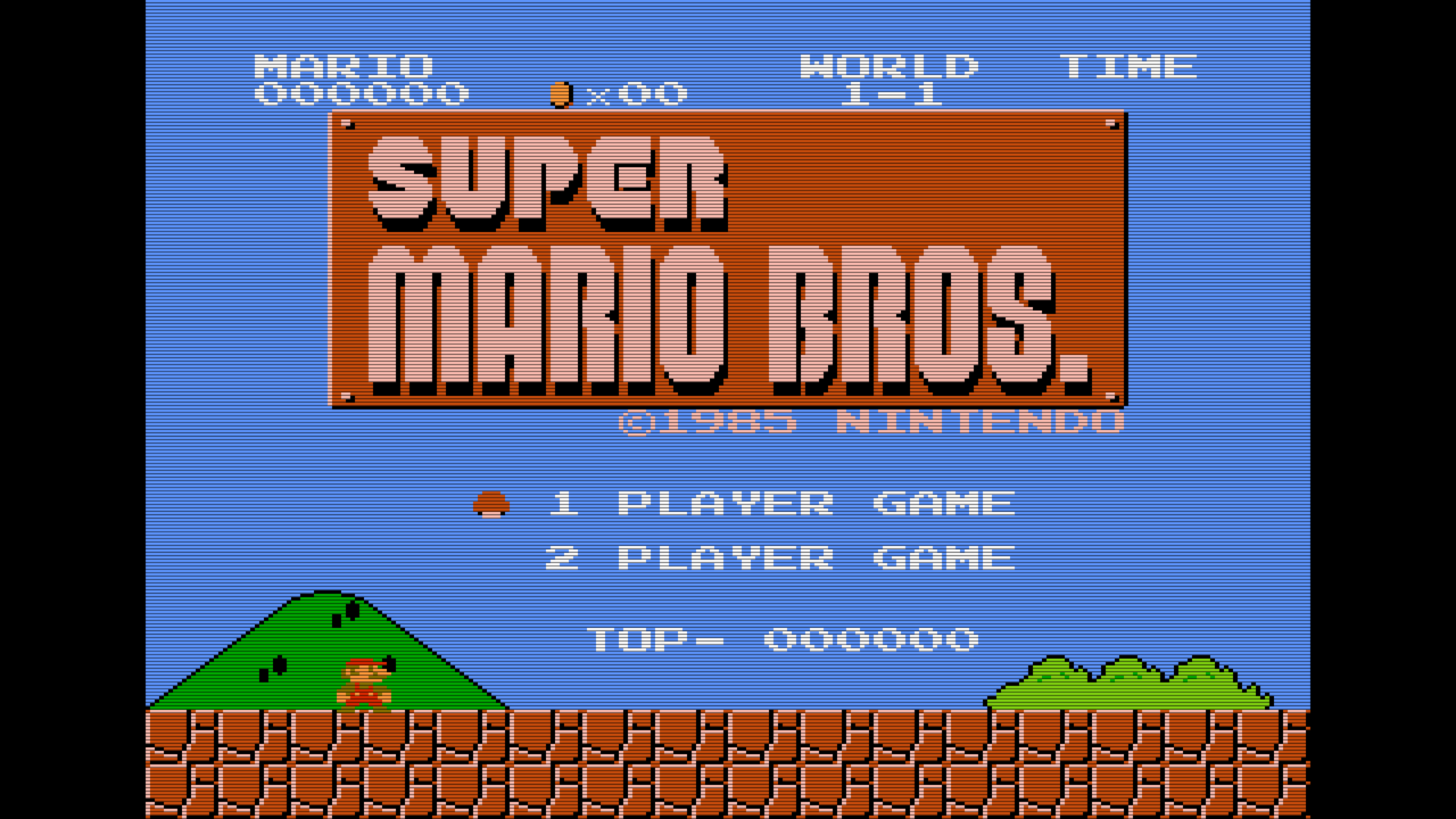
The actual screen looks just as good on my ASUS as I envisioned it would in this prototype screenshot I created a couple years back  Super Mario Bros 4x3 SCANLINE 1920X1080 by stardust4ever


-------------------------
~From the Nintendo/Atari addict formerly known as StarDust4Ever...


Edited: 07/10/2017 at 11:35 PM by Kosmic StarDust

Jul 16, 2017 at 12:41:38 PM
Selective_Memory (0)
avatar
< Cherub >
Posts: 7 - Joined: 07/16/2017
Profile
I freaking love my AVS. I got mine off ebay back in March because I'm impatient and didn't want to wait until May (I think that was the latest estimate at the time). I bought a PowerPak and a "kazzo" rom dumper the next day and now I owe the retrousb guys 5 wingwangs (they sent me a 4gig card when I ordered a 2 gig). I gotta figure out how to reconcile that... I've become a big fan of retroUSB's stuff the last year, I can't wait for my new controller to ship!

I haven't had the "green strip" problem because the games I want to play, I just put on my PowerPak, but I do worry about that USB port. I covered it with epoxy in hopes that it'll strengthen it just enough to prevent a break if something unfortunate happens.