Skip navigation
NintendoAge
Welcome, Guest! Please Login or Join
Loading...

Amazon Fire TV Stick... My thoughts. XBMC, and other stuff... Psst... you can play NES games on it. ;)

Dec 2, 2014 at 4:13:25 AM
spoonman (66)
avatar
(Matt - The Obsessed Gamer) < Ridley Wrangler >
Posts: 2681 - Joined: 09/19/2007
New York
Profile


I'm really impressed with the new Fire Stick.

I had owned an Amazon Fire TV previously, and thought that was tiny, but now you get nearly the same thing in a stick about the same size as the Chromecast.

It pretty much blows the Chromecast out of the water IMO. It has a faster dual core CPU, 8GB of internal storage, 1 GB of RAM, comes with a remote.
You can also buy a remote with voice recognition searching or use an app which does the same. 

Out of the box It's a great internet media player with speedy access to Netflix, YouTube, Amazon Video, Pandora, Amazon Prime Music, Amazon Cloud Photos, and so on.
In addition you can also download and play many Amazon games such as Sonic 4, Table Top Racing, etc..

But where things get really interesting is when you sideload apps such as Kodi Media Player (Kodi.tv) formally XBMC. For people who don't know what this is check it out. It's basically the best media center money can't buy. It's free. It looks gorgeous, automatically downloads box art, movie posters, thumbnails, and links to IMDB for info. 

I'm happy to report that the Fire TV Stick is more than capable of streaming a high bitrate 1080p movie without any slowdown or hiccups. 
You can add-on ons of internet video channels, including one which streams every episode of South Park from their website. Very cool!

Since you can sideload just about any Android (.apk file), this also opens up options for emulators. There are a couple downsides however.
The first is the lack of an extra USB slot on the Stick. There is a Micro USB slot, but this is needed to power the Stick. Maybe someone will figure out a way to split this off.
I personally like the extra USB slot on the Amazon Fire TV (non stick version) because I have an Xbox 360 Wireless Controller dongle. So I can use 4 360 controllers to play games. You can however buy an Amazon branded gamepad for $40. There may be other Bluetooth controllers that work. I haven't really looked into it yet.

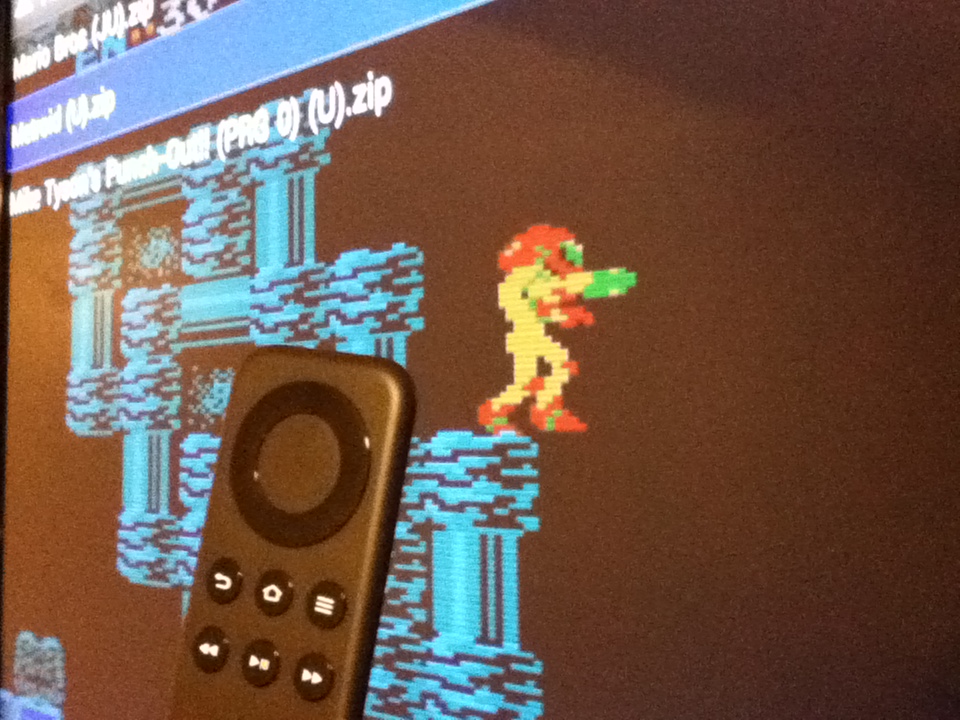
I found the Fire TV Stick remote worked out pretty well for NES games. You can remap all of the buttons and use it sideways like a Wii Remote. 

Here is Metroid playing on the Stick.


Another downside is there is no way to add external storage (as of this writing) so you have 8GB (about 5 GB after all updates to Fire TV OS and default apps).
So adding the full MAME romset is unlikely (Not to mention probably illegal).

I was able to install Google Chrome, and it looks awesome, but without a keyboard it wasn't very useful. Same with Google Earth..I couldn't control it with the remote or app.

Anyway, those are my thoughts on it so far. Let me know if you own one and what you think of it, or if you have any questions. 

Oh, and I picked up 3 of them for $19.99 ea. from Bestbuy.com. It seems the sale it over, but I'm betting it will go on sale again before Xmas. 



Edited: 12/02/2014 at 07:28 AM by spoonman

Dec 2, 2014 at 9:27:43 AM
Ozzy_98 (8)
avatar
< Bowser >
Posts: 6369 - Joined: 12/11/2013
Ohio
Profile
I've been using PIs with openelec\XBMC on them lately (As in, got my first one last Wednesday, second one on Friday), I just set it up with a central MySQL server so if I start a show in one room, I can resume in another.

If you have a computer always running, you can set up a share on it, and mount it as a source in XBMC\Kodi and use something like rom collection browser to launch them.

Dec 2, 2014 at 11:34:48 AM
Shane (146)
avatar
(Excellence of Execution) < King Solomon >
Posts: 4268 - Joined: 03/05/2011
United States
Profile
I was curious about this so thanks for the write up. We recently got a Roku 3 a couple months back and it's been awesome.

Dec 2, 2014 at 6:06:12 PM
spoonman (66)
avatar
(Matt - The Obsessed Gamer) < Ridley Wrangler >
Posts: 2681 - Joined: 09/19/2007
New York
Profile
Originally posted by: Ozzy_98

I've been using PIs with openelec\XBMC on them lately (As in, got my first one last Wednesday, second one on Friday), I just set it up with a central MySQL server so if I start a show in one room, I can resume in another.

If you have a computer always running, you can set up a share on it, and mount it as a source in XBMC\Kodi and use something like rom collection browser to launch them.

Yeah, that's where media players like this excel. We have our entire DVD collection on a server, along with about 200 BluRay 1080p rips, and tons of TV shows.
I bought two more 4 TB hdds during the Black Friday sale for $79 each bringing us up to 16 TB of space. We should be good for a while.

I love how well Kodi is running on the Fire Stick. It's extremely fast and the dual MIMO WiFi (N) keeps 1080p content flowing without any buffering or loss of quality.

Kodi rocks.


Edited: 12/02/2014 at 06:08 PM by spoonman

Dec 2, 2014 at 7:28:59 PM
Jobber8742 (185)
avatar
(Jeff Kilgard) < Lolo Lord >
Posts: 1660 - Joined: 06/23/2010
Illinois
Profile
Originally posted by: spoonman

Originally posted by: Ozzy_98

I've been using PIs with openelec\XBMC on them lately (As in, got my first one last Wednesday, second one on Friday), I just set it up with a central MySQL server so if I start a show in one room, I can resume in another.

If you have a computer always running, you can set up a share on it, and mount it as a source in XBMC\Kodi and use something like rom collection browser to launch them.

Yeah, that's where media players like this excel. We have our entire DVD collection on a server, along with about 200 BluRay 1080p rips, and tons of TV shows.
I bought two more 4 TB hdds during the Black Friday sale for $79 each bringing us up to 16 TB of space. We should be good for a while.

I love how well Kodi is running on the Fire Stick. It's extremely fast and the dual MIMO WiFi (N) keeps 1080p content flowing without any buffering or loss of quality.

Kodi rocks.


You say it handles 1080 well, but does it handle uncompressed Blu-Rays at all? I haven't found anything that really handles them well besides PCs. I use MediaBrowser for my media server. I have about 50TB worth of stuff on there. I have no interest in downcoverting anything though. I ordered one of these during the $19 Amazon special. Kind of bummed you were able to get one from Best Buy and I still haven't got mine from Amazon themselves.


-------------------------
"I'm not a nerd, I'm a video game enthusiast"

Dec 2, 2014 at 7:56:11 PM
punkr13 (115)
avatar
(B Rye) < King Solomon >
Posts: 4632 - Joined: 04/25/2011
California
Profile
Might have to check it out.

Been using the ouya as my xbmc player, pretty simple on that and it has a USB port for keyboard action

-------------------------

my art stuff: http://punkr13.deviantart.com/...

my FS thread: http://www.nintendoage.com/forum/...


Dec 6, 2014 at 3:59:39 AM
spoonman (66)
avatar
(Matt - The Obsessed Gamer) < Ridley Wrangler >
Posts: 2681 - Joined: 09/19/2007
New York
Profile
Originally posted by: punkr13

Might have to check it out.

Been using the ouya as my xbmc player, pretty simple on that and it has a USB port for keyboard action
That's cool. I nearly bought an Ouya last year. Do you know if it can it handle 1080p MKV vids without frame drops?

That's the only thing keeping the Amazon Fire TV Stick from being the ultimate, tiny, emulation solution, is the lack of external storage. 
I've been adding and testing a bunch of them; NES, GEN, NEO-GEO, 2600, TG-16, SNES, and they work great. Maybe there is a way to add a LAN shortcut and open roms from there. That would solve that problem. 

For $20 I'm very impressed with it. 


Dec 6, 2014 at 1:26:17 PM
Ozzy_98 (8)
avatar
< Bowser >
Posts: 6369 - Joined: 12/11/2013
Ohio
Profile
Originally posted by: spoonman

Originally posted by: punkr13

Might have to check it out.

Been using the ouya as my xbmc player, pretty simple on that and it has a USB port for keyboard action
That's cool. I nearly bought an Ouya last year. Do you know if it can it handle 1080p MKV vids without frame drops?

That's the only thing keeping the Amazon Fire TV Stick from being the ultimate, tiny, emulation solution, is the lack of external storage. 
I've been adding and testing a bunch of them; NES, GEN, NEO-GEO, 2600, TG-16, SNES, and they work great. Maybe there is a way to add a LAN shortcut and open roms from there. That would solve that problem. 

For $20 I'm very impressed with it. 
 
If you use XBMC and rom collection to launch them you can, that's how I do it on my XBMC devices.  I have a NORCO-4020 case I use for storage to stream everything through the house.


Dec 10, 2014 at 1:30:32 AM
spoonman (66)
avatar
(Matt - The Obsessed Gamer) < Ridley Wrangler >
Posts: 2681 - Joined: 09/19/2007
New York
Profile
Originally posted by: Ozzy_98

Originally posted by: spoonman

Originally posted by: punkr13

Might have to check it out.

Been using the ouya as my xbmc player, pretty simple on that and it has a USB port for keyboard action
That's cool. I nearly bought an Ouya last year. Do you know if it can it handle 1080p MKV vids without frame drops?

That's the only thing keeping the Amazon Fire TV Stick from being the ultimate, tiny, emulation solution, is the lack of external storage. 
I've been adding and testing a bunch of them; NES, GEN, NEO-GEO, 2600, TG-16, SNES, and they work great. Maybe there is a way to add a LAN shortcut and open roms from there. That would solve that problem. 

For $20 I'm very impressed with it. 
 
If you use XBMC and rom collection to launch them you can, that's how I do it on my XBMC devices.  I have a NORCO-4020 case I use for storage to stream everything through the house.


Oh yeah?, that sounds cool.
So you don't load the game from within the emulators? I have the newest Kodi Release Candidate build.


Dec 10, 2014 at 8:06:13 PM
spoonman (66)
avatar
(Matt - The Obsessed Gamer) < Ridley Wrangler >
Posts: 2681 - Joined: 09/19/2007
New York
Profile
Just cross-posting this from another thread. It might be useful to someone.

No modding necessary. It's easy to sideload apps onto the Amazon Fire Stick (or Fire TV)

Sideload apps onto the Fire Stick:
1. Go to settings, Developer Options, Turn ON ADB Debugging, Turn on Allow Apps from Unknown Sources.
2. Go to settings, write down the IP address of the Fire Stick (192.168.1.xx)
3. Install adbfw114 on your PC or Mac
4. Just start up ADBFW and install the various APK files.
5. To run them go to Settings, Applications, Manage Installed Apps and run them**.

** There is a more advanced way to make a shortcut on the main Amazon Fire TV carousel by installing Llama and making a donar app load Kodi (or whatever you chose). I have "TubiTV" launch Kodi since it's icon looks like a TV.

The best free Android emulators are by Robert Broglia Here (all are 100% compatible with the Fire Stick/TV)
Media Center: Kodi / XMBC release for Android (kodi-14.0-Helix_rc3-armeabi-v7a) here

6. To get roms onto your Fire Stick you can use ES File Explorer to access your internal Fire Stick storage. Just install it using ADBFW and once it's running have it scan for a shared networked drive with your roms.
Then copy and paste to a roms dir.

Dec 10, 2014 at 8:17:13 PM
Jobber8742 (185)
avatar
(Jeff Kilgard) < Lolo Lord >
Posts: 1660 - Joined: 06/23/2010
Illinois
Profile
Got mine in today. I'll have to check it out.

-------------------------
"I'm not a nerd, I'm a video game enthusiast"

May 24, 2015 at 8:51:54 PM
spoonman (66)
avatar
(Matt - The Obsessed Gamer) < Ridley Wrangler >
Posts: 2681 - Joined: 09/19/2007
New York
Profile
Originally posted by: Jobber8742

Originally posted by: spoonman

Originally posted by: Ozzy_98

I've been using PIs with openelec\XBMC on them lately (As in, got my first one last Wednesday, second one on Friday), I just set it up with a central MySQL server so if I start a show in one room, I can resume in another.

If you have a computer always running, you can set up a share on it, and mount it as a source in XBMC\Kodi and use something like rom collection browser to launch them.

Yeah, that's where media players like this excel. We have our entire DVD collection on a server, along with about 200 BluRay 1080p rips, and tons of TV shows.
I bought two more 4 TB hdds during the Black Friday sale for $79 each bringing us up to 16 TB of space. We should be good for a while.

I love how well Kodi is running on the Fire Stick. It's extremely fast and the dual MIMO WiFi (N) keeps 1080p content flowing without any buffering or loss of quality.

Kodi rocks.


You say it handles 1080 well, but does it handle uncompressed Blu-Rays at all? I haven't found anything that really handles them well besides PCs. I use MediaBrowser for my media server. I have about 50TB worth of stuff on there. I have no interest in downcoverting anything though. I ordered one of these during the $19 Amazon special. Kind of bummed you were able to get one from Best Buy and I still haven't got mine from Amazon themselves.


Sorry to bump an old post, but I just saw a bookmark to this and realized  never answered your question.
So to answer it, no, I doubt it could decode an uncompressed Blu-Ray image, but even if it could it would surely be bottlenecked from even the fastest Wi-Fi connection.

You have 50TB of media? How many drives does that work out to be?!
I thought owning 4 3TB drives was excessive.
I'm pretty happy with high bitrate video (8k-10kbps) 1080p AC3 6 channel audio BRips.
              
I also wanted to mention, for those who don't know, Amazon has released an update for the Fire TV (not the TV Stick)
which lets you use an external USB memory stick, USB hub, as well as USB mice and keyboards.
This makes it perfect for emulators now that you dont have to worry about using up all of the 5GB of internal storage.

I bought a 64GB USB stick for only $15 and an Amazon Essentials 5 port hub for $4 and they work great.


May 25, 2015 at 7:28:12 PM
Ozzy_98 (8)
avatar
< Bowser >
Posts: 6369 - Joined: 12/11/2013
Ohio
Profile
I just ordered two more, to go with that $180 40" TV tiger direct had up today, so that brings the total to 2 FireTVs and 3 sticks.

I'm running a modified confluence skin that allows android apps too, so that's nice being able to get them all in one device, some of the fireTV video players (Like Netflix and hulu) work so much better than the Kodi ones.

May 26, 2015 at 3:12:10 AM
spoonman (66)
avatar
(Matt - The Obsessed Gamer) < Ridley Wrangler >
Posts: 2681 - Joined: 09/19/2007
New York
Profile
Originally posted by: Ozzy_98

I just ordered two more, to go with that $180 40" TV tiger direct had up today, so that brings the total to 2 FireTVs and 3 sticks.

I'm running a modified confluence skin that allows android apps too, so that's nice being able to get them all in one device, some of the fireTV video players (Like Netflix and hulu) work so much better than the Kodi ones.
Nice. I'm waiting for the Sticks to drop down to $19.99 so I can get another for our outside monitor. I just wish there was an extra USB port on the Stick for adding extra storage. 5 GB runs out rather quickly.

It's a nice setup with Kodi and emulators. Google Chrome also works well with Logitech mouse and keyboard on the Fire TV.
I also recommend installing Llama and linking a Fire TV app with Kodi. It makes it much nicer to launch Kodi via an icon on at the top of the recently accessed apps. (We use Tubi since its a tub of popcorn and a free so) 
I have one linked to MAME as well.

A friend of mine designed an API to interface Kodi on the Fire TV with the Amazon Echo so, for example, he can say, "Alexa, play Star Wars Episode 4" and it will automatically launch it. Pretty cool stuff.