Skip navigation
NintendoAge
Welcome, Guest! Please Login or Join
Loading...

Homebrew 8 BIT XMAS 2016 development OUT NOW!!!!

Jun 15, 2016 at 10:53:04 AM
Shane (146)
avatar
(Excellence of Execution) < King Solomon >
Posts: 4268 - Joined: 03/05/2011
United States
Profile
In-game Christmas music? Hell yeah!


Jun 16, 2016 at 1:46:40 PM
bunnyboy (81)
avatar
(Funktastic B) < Master Higgins >
Posts: 7704 - Joined: 02/28/2007
California
Profile
8 BIT XMAS 2016 development video #11

Setting up for background bankswitching. Only 256 background tiles can be active at a time, so to get better graphics the active set is swapped a few times. You can see the lighter 1-2-3-4 on the left side that shows where a new bank is starting.

Right side stats also finished. Points ladder, bonus multiplier, double points, extra ball, and hold bonus.

Originally recorded on June 10. Haven't done much work in the last few days so videos are almost caught up to real time.

https://www.facebook.com/retroUSB...


Edited: 06/17/2016 at 11:41 PM by bunnyboy

Jun 16, 2016 at 2:13:03 PM
gamer78 (1)
This user has been banned -- click for more information.
< Crack Trooper >
Posts: 158 - Joined: 03/22/2016
Profile
Are the paddles A and B?

Jun 16, 2016 at 2:17:06 PM
bunnyboy (81)
avatar
(Funktastic B) < Master Higgins >
Posts: 7704 - Joined: 02/28/2007
California
Profile
dpad for left paddle, A/B for right paddle, select for launcher.

Jun 16, 2016 at 2:22:00 PM
gamer78 (1)
This user has been banned -- click for more information.
< Crack Trooper >
Posts: 158 - Joined: 03/22/2016
Profile
Originally posted by: bunnyboy

dpad for left paddle, A/B for right paddle, select for launcher.

NOOOOOOOOOOOOOOOOOOOOOOOOOOOOOOOOOOOOO!!!!!!
How much would it cost to have a custom cartridge made with A/B as the paddles? I tried a game with the directional pad as a flipper before and it was awkward.
 

Jun 16, 2016 at 2:42:05 PM
Mega Mario Man (63)
avatar
(Tim ) < Ridley Wrangler >
Posts: 2743 - Joined: 02/13/2014
Nebraska
Profile
Originally posted by: bunnyboy

dpad for left paddle, A/B for right paddle, select for launcher.
This is going to be very tough to play on my Quickshot Joystick.  


-------------------------
Current Project
Isometric Survival Horror

Older Projects
Tailgate Party, Power Pad Demo, Happy Hour

Links
Store, Facebook, Twitter

Jun 16, 2016 at 2:42:09 PM
bunnyboy (81)
avatar
(Funktastic B) < Master Higgins >
Posts: 7704 - Joined: 02/28/2007
California
Profile
If theres time I can make that into a title screen option, along with powerpad support  

Jun 16, 2016 at 2:43:59 PM
gamer78 (1)
This user has been banned -- click for more information.
< Crack Trooper >
Posts: 158 - Joined: 03/22/2016
Profile
Powerpad would be awesome! Next up.....Zapper support, Roll 'n Rocker and U-Force.

Jun 16, 2016 at 7:42:22 PM
Kosmic StarDust (44)
avatar
(Alita Jean) < Master Higgins >
Posts: 9158 - Joined: 09/10/2011
Louisiana
Profile
Originally posted by: gamer78
 
Originally posted by: bunnyboy

dpad for left paddle, A/B for right paddle, select for launcher.

NOOOOOOOOOOOOOOOOOOOOOOOOOOOOOOOOOOOOO!!!!!!
How much would it cost to have a custom cartridge made with A/B as the paddles? I tried a game with the directional pad as a flipper before and it was awkward.
 
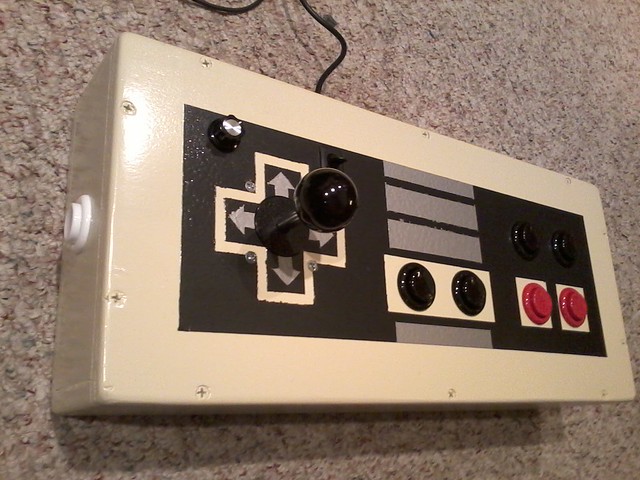
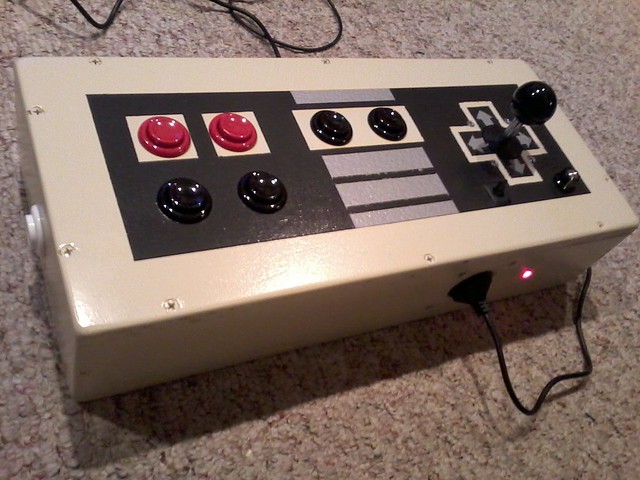
Most all games utilize the Dpad. It doesn't feel awkward at all to use a Dpad as a button. Joysticks on the other hand, feel very wierd. I'm a big fan of pinball so I simply drilled an extra pair of holes as side flippers on my NES Arcade stick. The right flipper is parallel connected to A; the left flipper is parallel connected to Left.


https://www.flickr.com/photos/302...

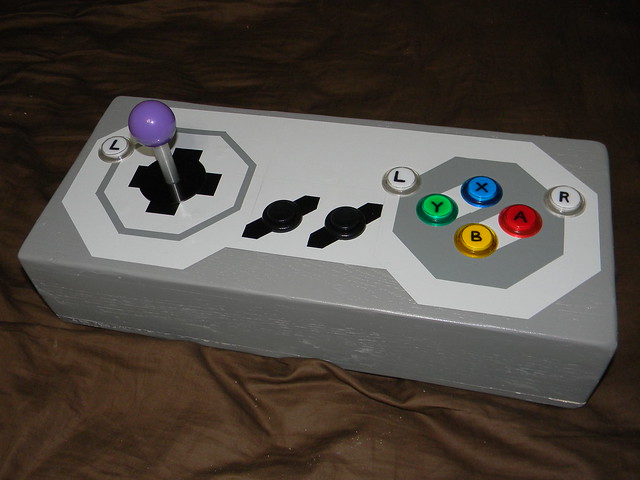
The SNES controller I did not drill side buttons for pinball since most games can be reconfigured via menu to use the L and R for flippers. I included an extra L flipper to the left of the joystick so all good:

https://www.flickr.com/photos/302...
 

-------------------------
~From the Nintendo/Atari addict formerly known as StarDust4Ever...

Jun 17, 2016 at 11:40:42 PM
bunnyboy (81)
avatar
(Funktastic B) < Master Higgins >
Posts: 7704 - Joined: 02/28/2007
California
Profile
8 BIT XMAS 2016 development video #12.

A big part of NES development is spent on things other than NES code. I frequently use Excel to build data tables, or write text/data parsing apps in C.

Here I start with an oval, drawn using 256 angles. Then a smaller circle uses the oval as a centerline and points along the circle are picked to make a wobbly oval. Think SPIROGRAPH!  A few different sizes of ovals and circles are put together to get multiple paths to follow. I don't want the objects to be exactly on the line, so some speed/acceleration/randomness is added in. The video is the first attempt at following the line, which obviously did not work as planned  

https://www.facebook.com/retroUSB...


Edited: 06/17/2016 at 11:42 PM by bunnyboy

Jun 18, 2016 at 12:17:42 AM
Kosmic StarDust (44)
avatar
(Alita Jean) < Master Higgins >
Posts: 9158 - Joined: 09/10/2011
Louisiana
Profile
^^Look like a fly buzzing around!  

-------------------------
~From the Nintendo/Atari addict formerly known as StarDust4Ever...

Jun 19, 2016 at 2:49:55 AM
bunnyboy (81)
avatar
(Funktastic B) < Master Higgins >
Posts: 7704 - Joined: 02/28/2007
California
Profile
8 BIT XMAS 2016 development video #13.

Working much better than the last video! The number shows which lane the guys are in. Still needs more randomness, probably more separation between the lanes, and of course graphics/music.

https://www.facebook.com/retroUSB...


Edited: 06/19/2016 at 02:50 AM by bunnyboy

Jun 19, 2016 at 8:18:40 PM
bunnyboy (81)
avatar
(Funktastic B) < Master Higgins >
Posts: 7704 - Joined: 02/28/2007
California
Profile
8 BIT XMAS 2016 dev #14 - placeholder graphics

Should be easier to tell which game these graphics were stolen from. This is 16 skaters, each is 4 8x8 pixel sprites, so every sprite is used. Same gray line showing CPU usage as before. If each skater only used 3 sprites (head, body, body) there could be 21 but I think that wouldn't look any better. There is already parts disappearing when more than 8 sprites in a scanline line up. Doing sprite cycling makes them blink instead of disappear but then the front to back order gets messed up. Everyone will just need to use the 15 sprites per scanline option on the AVS  

https://www.facebook.com/retroUSB...


Edited: 06/19/2016 at 08:18 PM by bunnyboy

Jun 19, 2016 at 8:28:15 PM
mattbep (107)
avatar
(Former Scramble Champion) < King Solomon >
Posts: 4959 - Joined: 04/04/2014
Pennsylvania
Profile
I guessed it after seeing #13 on Twitter. Very cool idea for the title screen!

Jun 19, 2016 at 9:05:09 PM
Kosmic StarDust (44)
avatar
(Alita Jean) < Master Higgins >
Posts: 9158 - Joined: 09/10/2011
Louisiana
Profile
Your hockey players look good! Nice first effort for a title screen. I hope the final ROM will allow "flicker mode" so that it runs without glitching on original hardware. Not everyone will be playing on AVS you know!  

-------------------------
~From the Nintendo/Atari addict formerly known as StarDust4Ever...

Jun 20, 2016 at 10:28:41 PM
MODERATOR
fsped09 (234)
avatar
(( nes-city.com )) < King Solomon >
Posts: 3999 - Joined: 09/11/2011
New York
Profile
Loving this thread!!

Jun 21, 2016 at 12:05:29 AM
bunnyboy (81)
avatar
(Funktastic B) < Master Higgins >
Posts: 7704 - Joined: 02/28/2007
California
Profile
8 BIT XMAS 2016 dev #15 - title animations

More animations! Still using graphics from Ice Hockey, but now they skate and rotate. I am considering doing only 10-12 skaters so there are fewer sprite limit problems. Almost all the remaining work is graphics and music. Those parts are done by other people so this is probably the last video for a while!

https://www.facebook.com/retroUSB...


Edited: 06/21/2016 at 12:05 AM by bunnyboy

Jun 21, 2016 at 12:38:57 AM
mattbep (107)
avatar
(Former Scramble Champion) < King Solomon >
Posts: 4959 - Joined: 04/04/2014
Pennsylvania
Profile
Every video has felt like a Christmas present. Thanks again for letting us follow along. I think this year will be extra special because of it.

10-12 skaters is fine with me! I recommend putting a lighted tree in the center though!

Jun 21, 2016 at 1:00:52 AM
bunnyboy (81)
avatar
(Funktastic B) < Master Higgins >
Posts: 7704 - Joined: 02/28/2007
California
Profile
Yup there will be a christmas tree (possibly spinning) and some kind of grassy area around the edge so it looks like a pond. Should be able to make xmas lights on the tree change colors too.

Jun 21, 2016 at 1:53:44 AM
Kosmic StarDust (44)
avatar
(Alita Jean) < Master Higgins >
Posts: 9158 - Joined: 09/10/2011
Louisiana
Profile
Originally posted by: bunnyboy

Yup there will be a christmas tree (possibly spinning) and some kind of grassy area around the edge so it looks like a pond. Should be able to make xmas lights on the tree change colors too.
So the ice skaters are skating in circles around a frozen pond on the title screen, if I'm reading you right? It would be cool to sync the tree lights with the LEDs too...  


-------------------------
~From the Nintendo/Atari addict formerly known as StarDust4Ever...


Edited: 06/21/2016 at 01:54 AM by Kosmic StarDust

Jun 21, 2016 at 2:37:45 AM
user (6)

< El Ripper >
Posts: 1462 - Joined: 05/30/2014
Profile
This machine is cheating! Too many magnets!  

Seriously, nice videos, most interesting video is #11 for me. The realism seems really good, from what I can tell the ball* moves naturally with correct inertia and react correctly to the triggers* on the board*. All triggers are made by sprites, correct?

Two quick questions:

1. it is hard to count pixels on a video, but in video #11 it looks like the playfield* for the ball goes up to the top and to the left side of the screen area; I'm wondering if there is a black unused part of the screen around it or not. I mean, I read often about leaving a border around the important content because of old TVs curved screens. So, I wonder, if it is a choice because now everyone has modern TVs, or there is a margin but it is just not visible on video, or maybe it is not really important content when the ball exits the visible screen, or is distorted, for a tiny fraction of second on an old TVs deforming the screen area: I mean, it is not like a status bar or statistics that must be visible and clearly readable, your eye (and brain) will imagine what (virtually) happened anyways. However, I was wondering if an empty margin is required in such cases or it is not really required. I hope this makes sense in English.

2. when you check for sprite collision, I suppose you check against their y and x positions in RAM page $0200, correct? I mean, there is not need for a further buffer storing their x,y position, the buffer in $0200 is enough for both, check collisions, and position them on screen, I guess. This is what I do when sprites collision checks are needed, I'm just wondering if there are good reasons to don't.

Thanks.

* ok, I have no clue about pinball terminology in English; I hope that board, trigger, ball and playfield are acceptable enough.
I know flipper, but because we call the whole pinball with the term flipper here.  

 

Jun 21, 2016 at 3:49:20 AM
Kosmic StarDust (44)
avatar
(Alita Jean) < Master Higgins >
Posts: 9158 - Joined: 09/10/2011
Louisiana
Profile
This might help:

ball - steely bearing you play the game with
plunger - pull back to release the ball in play
flipper - you control the ball's trajectory by hitting it
playfield - area the ball moves around in
drain - below the flipper where your ball in play goes when you lose it
pin - static peg sticking up from the playfield that the ball collides with
bumper - repels the ball when it collides with the object
pop bumper - round bumper with metalic ring that deflects the ball
roll over - detects when a ball passes over it.
drop target - drops when ball hits it. Typically a goal is to activate a group of drop targets triggers an event
trap - locks ball in play, typically a precursor to activating multiball.
outlane - lanes on the outer edges of the lower playfield that typically drain the ball
inlane - lanes near the outer edge that return the ball to the flipper
ramp - raised surface that lifts the ball off the playfield
toy - custom objects on playfield that you interact with, typically one-off designs used for a single table
ball hazard - obstruction in the playfield that impedes movement. In video game simulations refers to mobile enemies to be either destroyed by colliding with, or avoided by the pinball.

Electro-Mechanical - early era pinball tables with mechanical score reels, relay logic, and no CPU.
Solid State - middle era pinball tables with alpha-numeric displays.
Dot Matrix Display - late era pinball tables with displays capable of displaying graphics.

Pinball Sim - any video game simulation of pinball, whether realistic or fantasy

Not sure hat a "board" is though...  

-------------------------
~From the Nintendo/Atari addict formerly known as StarDust4Ever...


Edited: 06/21/2016 at 04:09 AM by Kosmic StarDust

Jun 21, 2016 at 4:14:25 AM
user (6)

< El Ripper >
Posts: 1462 - Joined: 05/30/2014
Profile
Originally posted by: Kosmic StarDust

This might help:

Not sure hat a "board" is though...  

It does!  

With ball and playfield I was correct, good.
With board, I meant the bottom part of the palyfield, where target and bumpers are, excluding ramps, and such special areas.
With trigger I meant both targets and bumpers.

Thanks!  
 

Jun 21, 2016 at 4:56:42 AM
Kosmic StarDust (44)
avatar
(Alita Jean) < Master Higgins >
Posts: 9158 - Joined: 09/10/2011
Louisiana
Profile
For more info then you'll ever need, consult the glossary:
http://ipdb.org/glossary.php...

-------------------------
~From the Nintendo/Atari addict formerly known as StarDust4Ever...

Jun 21, 2016 at 12:47:58 PM
bunnyboy (81)
avatar
(Funktastic B) < Master Higgins >
Posts: 7704 - Joined: 02/28/2007
California
Profile
Originally posted by: user

1. it is hard to count pixels on a video, but in video #11 it looks like the playfield* for the ball goes up to the top and to the left side of the screen area; I'm wondering if there is a black unused part of the screen around it or not. 
Right now the playfield is in the upper left for easier debugging.  When the real graphics are added everything will be shifted down and right to add the border area.  The top is the part that gets chopped most frequently so ~8 pixels of border (ball never goes there) then ~8 pixels that is ok to have hidden (ball can be partially seen).

 
Originally posted by: user

2. when you check for sprite collision, I suppose you check against their y and x positions in RAM page $0200, correct? I mean, there is not need for a further buffer storing their x,y position, the buffer in $0200 is enough for both, check collisions, and position them on screen, I guess. This is what I do when sprites collision checks are needed, I'm just wondering if there are good reasons to don't.
The object collision data is completely unrelated to the sprite data.  If you just read back from the sprite page then the round bumpers would be squares instead of circles.  I always treat the sprite page as write only, so first all the objects are moved/collided, then they are rendered into sprites, and never read back.  Also makes things like sprite cycling easier but that isn't used here.