Skip navigation
NintendoAge
Welcome, Guest! Please Login or Join
Loading...

FamicomBox menu pcb

Mar 18, 2008 at 6:14:47 PM
Gameboy (22)
avatar
(Stian Olsen) < Meka Chicken >
Posts: 632 - Joined: 08/27/2007
Norway
Profile
I'm trying to make a rom backup of the menu pcb in the FamicomBox.
The menu pcb has 72 pins and looks like a regular NES game pcb.
The problem is that I can't get my CopyNES to read it.
I was thinking of using a eprom programmer and reading from the PRG and CHR, but it would be a b**ch to desolder the chips.
Any tech-heads with some suggestions?

Mar 20, 2008 at 6:01:23 AM
Michael the Great (2)
avatar
(Michael the Great) < Little Mac >
Posts: 64 - Joined: 12/20/2007
United States
Profile
I assume your cic is disabled? Take a picture of the menu pcb.

Mar 20, 2008 at 7:25:31 AM
Gameboy (22)
avatar
(Stian Olsen) < Meka Chicken >
Posts: 632 - Joined: 08/27/2007
Norway
Profile
Originally posted by: Michael the Great

I assume your cic is disabled? Take a picture of the menu pcb.


If you by cic means the lockout chip, then yes it's disabled.

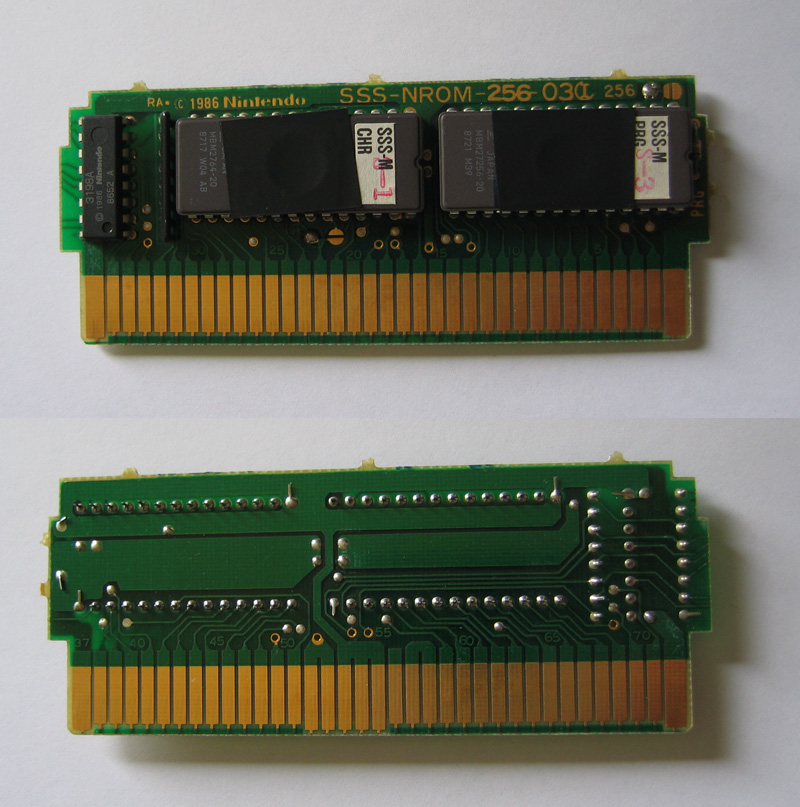
Here's a pic of the menu pcb:


Mar 21, 2008 at 12:57:29 PM
Michael the Great (2)
avatar
(Michael the Great) < Little Mac >
Posts: 64 - Joined: 12/20/2007
United States
Profile
Should be a standard nrom other than the cic. Do the famicombox games play in your copynes? Any trouble dumping them? How do you know that it's not working? Are you getting an error? Are you getting bad data? Does the rom that you download not work in an emulator?

Mar 21, 2008 at 1:55:30 PM
bunnyboy (81)
avatar
(Funktastic B) < Master Higgins >
Posts: 7704 - Joined: 02/28/2007
California
Profile
Quick look shows that the normally unused expansion port pins are connected somewhere, but it might just be power/ground/cic outputs. More description of what you actually are getting would be most useful.

Mar 21, 2008 at 3:24:31 PM
Gameboy (22)
avatar
(Stian Olsen) < Meka Chicken >
Posts: 632 - Joined: 08/27/2007
Norway
Profile
I've just tested two FB games and one doesn't work and one does.
No problem dumping the game and playing it in a emulator.

With the menu I just get a grey screen, I've tried to adjusting it sideways but with no luck.
It can be that not all the pins have contact since one of the FB games didn't work neither.
Maybe I could butcher a NES game pcb which have good contact on all the pins and then solder each of the pins on the FB menu pcb to it.


Edited: 03/21/2008 at 03:33 PM by Gameboy

Mar 21, 2008 at 4:09:31 PM
Gameboy (22)
avatar
(Stian Olsen) < Meka Chicken >
Posts: 632 - Joined: 08/27/2007
Norway
Profile
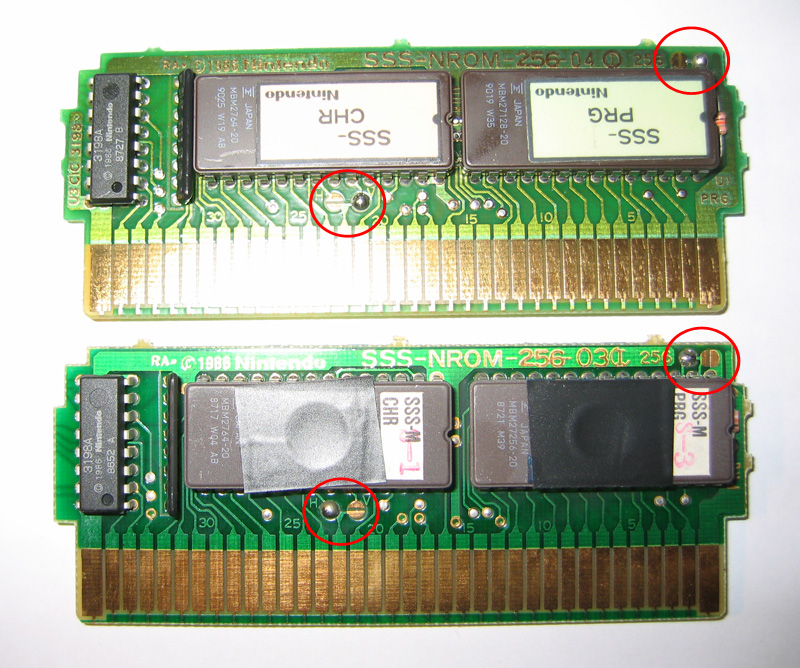
As you can see on this picture there is a little bit difference between the FamicomBox game and the menu pcb.
There's a soldered "jumper" in the opposite place on the menu compared to the game (marked with red rings).
Game at the top, menu at the bottom.


Mar 21, 2008 at 4:30:18 PM
bunnyboy (81)
avatar
(Funktastic B) < Master Higgins >
Posts: 7704 - Joined: 02/28/2007
California
Profile
Originally posted by: Gameboy

Maybe I could butcher a NES game pcb which have good contact on all the pins and then solder each of the pins on the FB menu pcb to it.

If possible don't do anything to the FB pcb, they are relatively rare.  Instead you can use a game genie to do any rewiring needed, either to a standard eprom programmer or to the copynes.  

For the solder blobs, the one on the bottom left is for the horizontal/vertical mirroring and should not affect dumping at all.  The one on the upper right may be an address pin, because those boards are using different size chips.  May want to check out more boards and see what that blob is set to.

Mar 21, 2008 at 4:47:06 PM
Gameboy (22)
avatar
(Stian Olsen) < Meka Chicken >
Posts: 632 - Joined: 08/27/2007
Norway
Profile
Don't worry, I'm not going to hurt any FB pcb's
I tried some other FB games and they are hard to get to work so there's probably just some connection problems on the menu as well.

So you mean I should gut my brand new game genie to make a straight trough adapter?
I have twelve of them so I guess I could sacrifice one

Mar 21, 2008 at 7:52:32 PM
Gameboy (22)
avatar
(Stian Olsen) < Meka Chicken >
Posts: 632 - Joined: 08/27/2007
Norway
Profile
Ok, so I plugged the menu into my FamicomStation.
It comes up at the menu screen but when I try to start it the screen goes grey.
So maybe it does that on the CopyNES too, so how would I check to see if my backup is working?

Mar 22, 2008 at 12:46:42 AM
Michael the Great (2)
avatar
(Michael the Great) < Little Mac >
Posts: 64 - Joined: 12/20/2007
United States
Profile
No easy way to test it since the famicombox isn't supported by any emulator. I would assume that if your other game dumped fine, that you probably got a good dump here too.

You could do some sort of jerry-rigged dump with an eprom programmer.

The long way: Get a famicom game to nes system converter (I'll sell you one for $6 shipped if you want). You just want it for the 72 pin connector. Get a 32 pin socket (or two). Solder wires between the correct 72 pin adapter pins and the 32 pin socket. You can get information on which 72 pin pin is which from the front page of nesdev. Dump it as you would dump an eprom. The bad side: A lot of work, won't dump many games.

The short way. Get a 32pin dip dual ended header (looks like a 32 pin dip socket--just no sockets pins on top and bottom). Plug it into your eprom programmer. Figure out a way to place the bottom of the eprom pins against the header pins for long enough to dump the eproms. The bad: fun to keep it in place long enough to dump.

Yeah, bunnyboy, the cic does go to the expansion pins for the famicombox games.