Skip navigation
NintendoAge
Welcome, Guest! Please Login or Join
Loading...

Reproduction Thermal NES/SNES Cartridge Label Printing ? Because I want to do it myself!

Sep 4, 2013 at 3:57:26 PM
aupton (11)
avatar
(aupton aupton) < Eggplant Wizard >
Posts: 260 - Joined: 03/17/2011
New Jersey
Profile
After recently completing a few repro carts for my own personal enjoyment and challenge I now would like to print some custom labels using my own artwork. I've tried printing a few test labels with a fairly decent Canon photo quality ink jet printer using adhesive/sticker paper and have been disappointed in the results. I'm pretty anal when it comes to quality. I already know its a reproduction, but that doesn't mean it has to look like someone just printed it on some generic home materials... I've seen a few members offering professional label printing services and even the high quality labels provided on RetroUsb and Timewalk games's products.

I'm of the mindset that says "I can do that too!", Thus why I started to make my own repro carts instead of paying someone else. So the same attitude drives me towards thermal printing options. It's clearly the way to go for that professional look and feel, but like most genres of products, there's a whole world of possibility out there and I don't know of any print specaility stores with an arsenal of thermal label printers waiting for me to play with and find the one that works best for me.

So, with all that said, I'm hoping there are similar minded NA members out there that wouldn't mind suggesting a few different thermal full color label printers that they perhaps have experience with? Any suggestion would be welcomed as I've looked at Zebra, Primera, Epson, and Brother. All have a wide varity of products that "may" do the job, but honestly feedback from NA members who have already gone down the same road for their personal projects is worth more to me than any unrelated user experience review.

Any suggestion would be greatly appreciated.

Thank you!


Edited: 06/27/2015 at 01:34 PM by NintendoAge Moderator

Sep 5, 2013 at 11:53:49 AM
aupton (11)
avatar
(aupton aupton) < Eggplant Wizard >
Posts: 260 - Joined: 03/17/2011
New Jersey
Profile
Perhaps I posted this in the wrong section ?

Sep 5, 2013 at 12:23:25 PM
millerjm2 (196)

(John Miller) < Meka Chicken >
Posts: 928 - Joined: 09/25/2010
United States
Profile
Honestly you can get pretty good results from a simple inkjet and good, quality, thick, mid-gloss paper from Staples. Print it out using the correct settings for your printer (best, etc), throw a piece of tape on top and super glue it to the cart and you are done.

-------------------------
 http://thisroomisanillusion.com/...


Sep 5, 2013 at 12:44:41 PM
Tanooki (185)
avatar
(The Wind Waker) < Bonk >
Posts: 17067 - Joined: 08/27/2010
Kentucky
Profile
You're better off using a white gloss label paper but make sure the type you get matches the printer you end up using for the best results. If you have a laser or inkjet printer use that style of label paper for best results.

Sep 6, 2013 at 12:58:13 PM
aupton (11)
avatar
(aupton aupton) < Eggplant Wizard >
Posts: 260 - Joined: 03/17/2011
New Jersey
Profile
Thanks for all your replies. I'll give it another shot this weekend on my Canon MP Inkjet using a different type of inkjet label. I previously tried "Avery sticker paper" and "LD Glossy Inkjet Photo Sticker Paper", both bled horribly... So words of advise to anyone else looking for perfection, those products aren't it. I'll share my results in this thread as I test various sticker paper, lament, and printer devices out... Hopefully I'll help put an end to the secrets that surrounds this topic and show others there's no reason to *PAY* someone else $5-$10 to print out a retail quality, long lasting label for you...

Sep 6, 2013 at 1:02:51 PM
SinNombre (16)
avatar
(Allen ?) < Meka Chicken >
Posts: 592 - Joined: 07/11/2011
Illinois
Profile
Cricut printable vinyl rocks. Then I slap on the packing tape to laminate it. I also have laminate if I feel like using it but the tape works so well...

http://www.ebay.com/itm/Cricut-Im...

I personally print with a Canon MG5320 and the quality looks damn good.


Edited: 09/06/2013 at 01:04 PM by SinNombre

Sep 6, 2013 at 1:14:30 PM
aupton (11)
avatar
(aupton aupton) < Eggplant Wizard >
Posts: 260 - Joined: 03/17/2011
New Jersey
Profile
@SinNombre - Thanks for your suggestion, I sincerely appreciate it! I'm going to order this now and will post my results.

Sep 10, 2013 at 8:29:47 PM
Gorillazero (53)
avatar
(Well That's Just Prime) < Lolo Lord >
Posts: 1807 - Joined: 07/26/2012
Michigan
Profile
In all honestly, ya we need to create a sub forum for "reproduction" lol.

I use sticky photo paper with high gloss

-------------------------
Bounty: Neo Geo Pocket and Color Games PAL/UK. Dive Alert, Pocket Reversi, Puzzle Link 1 and 2, Gals Fighters

Sep 12, 2013 at 6:00:45 PM
aupton (11)
avatar
(aupton aupton) < Eggplant Wizard >
Posts: 260 - Joined: 03/17/2011
New Jersey
Profile
I've achieved success! I'll post pics of the finished products, and a complete parts list so others can follow over the weekend when work and family aren't demanding my time Thanks again everyone.

Sep 16, 2013 at 1:17:44 PM
Saintkat (39)
avatar
(Justin Bailey) < Eggplant Wizard >
Posts: 232 - Joined: 09/04/2013
Alberta
Profile
Really curious to see your process! I'm actually curious about the many methods to make a label.

-------------------------
I need for a Sculptor's Cut and Stunt Racer 64 manual - final two for the collection!

Sep 17, 2013 at 1:36:50 PM
aupton (11)
avatar
(aupton aupton) < Eggplant Wizard >
Posts: 260 - Joined: 03/17/2011
New Jersey
Profile
Sorry for the long delay to all that have asked for an update, family and parenting come before obsessive hobbies, right ?  
 
So as promised I've tested various printing options based on many suggestions throughout the depths of the internet. I thought I was going to give up on the home inkjet approach, but I'm glad I didn't. The silver bullet for cost effective home inkjet cartridge labels is... 
 
Labels: OL175WG
 
Laminate: Scotch Clear Packing Tape.
 
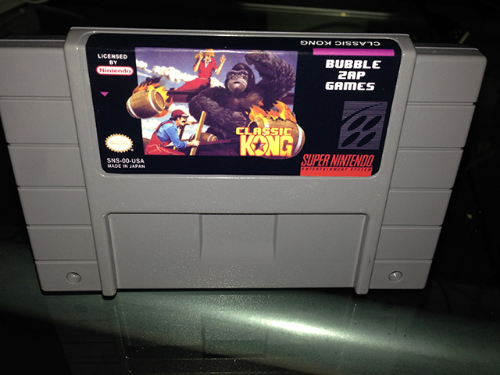
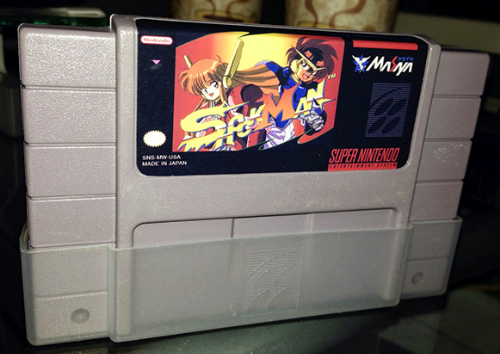
I printed two different tests, both with and without lamination. I'm leaning towards the laminated look for SNES cartridges and the non-laminated look for Genesis cartridges to match their retail look and feel. Both look incredible and do *NOT* show any signs of ink bleeding which was always the problem with all other printable labels I've tried.
 
Some pointers:
 
Clean your cartridges! If you are transforming (destroying) a cartridge into a different title you will want to make sure that the original label and glue are entirely removed. Also, you will want to clean up any grit or grime that may be lingering on these old cartridges. Opening the carts and socking the shells in anti-bacterial dish soap over night is a long but easy way to loosen up the label and its glue, plus remove any unwanted filth and contaminants that may be lingering. Use a thin putty knife to shave off the sticker and glue the following morning  and the use some glue gone to remove any remaining traces of glue. Afterwards a final washing through the dish soap is a must to remove any traces of glue gone and perhaps a quick brushing with an old toothbrush.

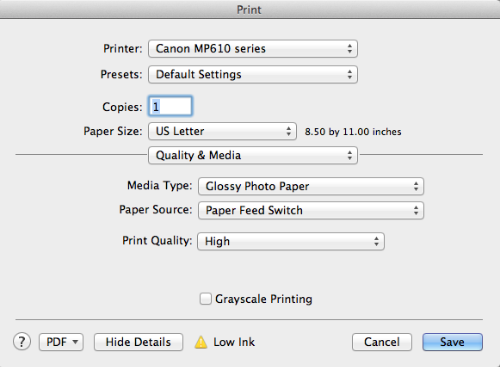
Proper print settings are a must! Assuming you are using the same labels then you will want to make sure you're printer property settings match the paper type you are using. On my Canon MP610 I'm using the "Glossy Photo Paper" and Print Quality as "High" setting. 


Lamination
Measure twice, cut once! Align the sticker so that all sides will be covered by a single piece of tape. Go slow and pick one of the 4 sides to start with and then slowly slide your finger left and right while slow creeping forward to make sure the sticker applies without any bubbles.


I hope this helps others who have struggled with this topic as I have... Many people refuse to share this info because it will eat into their profits or any other personal hang up they may have, I believe in giving back. The Nintendoage community has been very good to me and my appetite for projects such as these. I appreciate the labels that others have created and have freely shared with the community. I plan to do the same to encourage others to share as well. If someone wants to make money off of someone elses work, then so be it... They're destroying the hobby for themselves in an increasingly saturated reproduction market. A hobby stops being a hobby the moment it becomes work!

Best of luck to everyone.


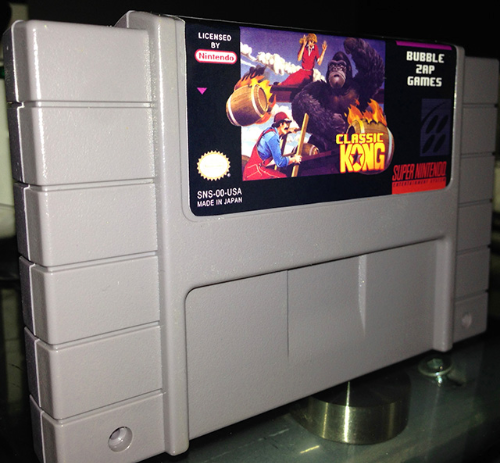
Some examples - Not laminated:

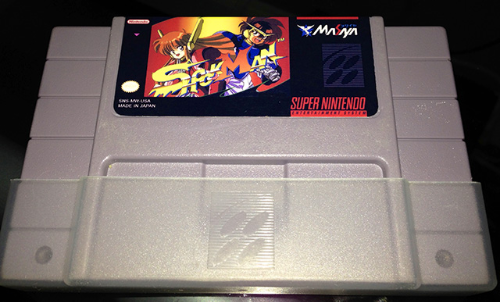
And Laminated:
 

Sep 17, 2013 at 2:57:36 PM
Piko (51)
This user has been banned -- click for more information.
< King Solomon >
Posts: 3185 - Joined: 12/29/2011
New Hampshire
Profile
Do you have a fie cutter?

-------------------------


Sep 17, 2013 at 3:12:57 PM
aupton (11)
avatar
(aupton aupton) < Eggplant Wizard >
Posts: 260 - Joined: 03/17/2011
New Jersey
Profile
I assume you mean a "die cutter" ? Sadly I do not, I cut them by hand, if you our anyone would be able to recommend a decent die cutter that could support multiple sizes, i.e. NES, SNES, Genesis I'd personally buy one because cutting IS a tedious job!

Sep 17, 2013 at 3:34:02 PM
Piko (51)
This user has been banned -- click for more information.
< King Solomon >
Posts: 3185 - Joined: 12/29/2011
New Hampshire
Profile
Ups yeah die cutter. Yes im looking for one myself.

-------------------------


Sep 17, 2013 at 5:38:05 PM
aupton (11)
avatar
(aupton aupton) < Eggplant Wizard >
Posts: 260 - Joined: 03/17/2011
New Jersey
Profile
Any reason why a Circuit or Silhouette wouldn't work? These devices seem ripe for printing and cutting templates. I imagine that if either can support Photoshop .psd files we can safely publish helpful image and cut templates for NA users to use. 
 
Thinking the process could work like this.
 
  1. Load up .psd template in Photoshop and add  create your images in their pre-defined (locked) locations/dimensions.
  2. Print the images on a single 8.5x11" sheet.
  3. Laminate the 8.5x11" sheet
  4. Place the already printed and laminated 8.5x11" sheet into a Circuit or Sihouette cutter and load up the associated cut template that knows the same locations and dimensions as the .psd file.
  5. Cut em!
Thoughts ?
 

Sep 17, 2013 at 7:28:41 PM
FancyPantsGamer (19)
avatar
(Dave ) < Eggplant Wizard >
Posts: 302 - Joined: 09/09/2009
Maryland
Profile
Someone used the classic king label I posted, that makes me happy.

Seeing as I don't really do repros anymore I should probably post all of my labels up here.

Sep 17, 2013 at 7:36:56 PM
aupton (11)
avatar
(aupton aupton) < Eggplant Wizard >
Posts: 260 - Joined: 03/17/2011
New Jersey
Profile
@PiM-Games , Thank you for your label, the attention to quality is top notch! I'd love to see more of your work

Sep 17, 2013 at 8:15:04 PM
Tanooki (185)
avatar
(The Wind Waker) < Bonk >
Posts: 17067 - Joined: 08/27/2010
Kentucky
Profile
This is some magnificent work, good job. Your process is basically the one I was made aware of when I've said 'I know a way' on such stuff but just never got to doing it myself. I probably should as I have a solid need for it, but I don't want to buy a bulk order of label paper I won't put to use.

If I could just order like 5 pages or so to learn the process and do it right that would be great.

Sep 20, 2013 at 3:16:47 PM
plc268 (5)

< Little Mac >
Posts: 83 - Joined: 08/12/2012
Texas
Profile
There's better options than the white gloss from onlinelabels (I know, I've suggested those in the past).

Also, if you're gonna laminate, don't do it with tape, do it with actual laminating sheets. You'll get a much better result.

Sep 22, 2013 at 12:26:50 AM
SinNombre (16)
avatar
(Allen ?) < Meka Chicken >
Posts: 592 - Joined: 07/11/2011
Illinois
Profile
I don't really notice much difference between quality tape and laminating sheets. Cheaper dollar store tape looks bad but the scotch moving and storage tape is pretty damn clear.

Jun 6, 2015 at 2:29:44 PM
theretrobandit (0)
avatar
(Taylor ) < Cherub >
Posts: 1 - Joined: 05/12/2015
California
Profile
Has anyone seen this happen to a label after about 2 weeks? It almost has a sun faded look now and isn't as vibrant as it was originally. The label did match the colors on the image the cart is on. Any input would be greatly appreciated.

https://www.dropbox.com/s/87an0sw...

Jun 26, 2015 at 12:45:53 PM
nickynooch (1)

< Cherub >
Posts: 9 - Joined: 09/08/2014
Florida
Profile
I can't find the button to delete my post...sorry!


Edited: 06/26/2015 at 12:48 PM by nickynooch